

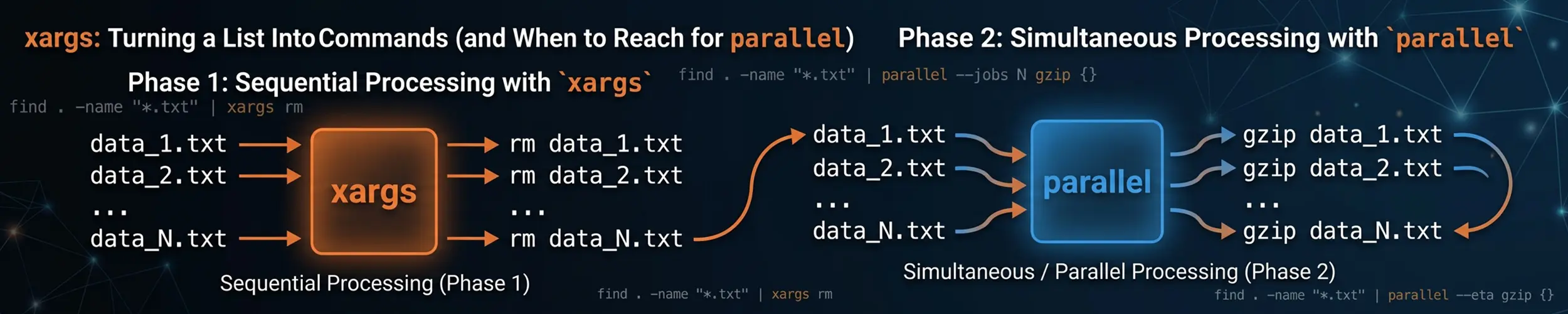
You have a list of things — files from find, lines from a file, output from another command — and you want to run something against each of them. Piping does not do it, because most commands read arguments, not standard input:
# does nothing useful: rm reads arguments, not stdin
find . -name '*.tmp' | rmxargs is the adapter between the two. It reads items from standard input and builds command lines out of them.
find . -name '*.tmp' | xargs rmThat works right up until a filename contains a space, at which point it deletes the wrong things.
The one flag that matters
By default xargs splits on whitespace, so My Holiday Photos.zip becomes three arguments. Paired with rm, that is a command trying to delete a file called My, one called Holiday, and one called Photos.zip. It also treats quotes and backslashes as syntax, which mangles anything containing them. The fix is to separate items with a null byte instead — the one character a filename cannot contain: find -print0 paired with xargs -0. Use that pairing every single time, not only when you expect awkward names.
find . -name '*.tmp' -print0 | xargs -0 rmOther producers have their own null-output flag: grep -lZ, sort -z, rg --null, fd -0. If a command has no such option, its output is not safe to pipe into xargs without thinking about what could be in it.
Why xargs exists at all
The other half of its job is the Argument list too long error. There is a kernel limit on the total size of a command line, and a glob that expands to fifty thousand filenames exceeds it:
rm /var/spool/old/*          # bash: /usr/bin/rm: Argument list too long

find /var/spool/old -type f -print0 | xargs -0 rmxargs batches automatically: it fills each command line to just under the limit, runs it, and starts another. Fifty thousand files might become four rm calls. This is why it is faster than a shell loop as well as safer — four processes instead of fifty thousand.
Controlling how it builds the command
| Flag | Does |
|---|---|
-0 | Input items are null-separated |
-n 1 | One item per command run, rather than as many as fit |
-I {} | Substitute each item at {} — implies one at a time |
-P 4 | Run four commands at once |
-r | Do not run at all if input is empty (GNU; default on BSD) |
-p | Ask before each command |
-t | Print each command as it runs |
-I {} is what you need when the item is not the last argument:
# wrong: puts every filename after the destination
find . -name '*.log' | xargs cp /backup/

# right
find . -name '*.log' -print0 | xargs -0 -I {} cp {} /backup/

# rename, using the item twice
find . -name '*.txt' -print0 | xargs -0 -I {} mv {} {}.bakNote the trade-off: -I runs the command once per item, so you lose the batching that made xargs fast. For a hundred files that does not matter; for a hundred thousand it does.
-r is worth adding to anything in a script. Without it, empty input still runs the command once with no arguments, and xargs rm with nothing to delete is harmless but xargs docker rm with nothing to remove prints a confusing error at 3am.
Look before you leap
Before running anything destructive, swap the real command for echo and read what it would have done:
find . -name '*.tmp' -print0 | xargs -0 echo rm

# or keep the command and confirm each one
find . -name '*.tmp' -print0 | xargs -0 -p rmThat habit costs two seconds and has saved a great many home directories.
Running things in parallel
# four at a time
find . -name '*.png' -print0 | xargs -0 -P 4 -I {} optipng {}

# one per CPU core
find . -name '*.wav' -print0 | xargs -0 -P "$(nproc)" -I {} flac {}-P is a genuine speed-up on anything CPU-bound, and free — no extra tools. The catch is output: several commands write to the same terminal simultaneously and their lines interleave, sometimes mid-line. That is fine when you are ignoring the output and fatal when you are collecting it.
For I/O-bound work, more parallelism is not better. Four concurrent jobs on a spinning disk are usually slower than one, because the head spends its time seeking. Match -P to the resource that is actually the bottleneck.
Where GNU parallel earns its place
parallel does the same job with better ergonomics for the harder cases.
sudo apt install parallel| You want | Use |
|---|---|
| Batching, and the safe handling of odd filenames | xargs -0 |
| Simple parallelism with output you ignore | xargs -0 -P |
| Parallel output kept in order, one job at a time | parallel |
| The filename without its extension, or its directory | parallel |
| Distributing work to other machines over SSH | parallel |
| A progress bar and a resumable job log | parallel |
# output stays grouped per job, not interleaved
find . -name '*.log' -print0 | parallel -0 grep -c ERROR {}

# the placeholders that save writing basename and dirname
parallel convert {} {.}.webp ::: *.png
parallel echo {/} ::: /some/long/path/*.txt      # basename only

# resume a long run after an interruption
parallel --joblog run.log --resume ./process.sh ::: input/*::: supplies arguments directly rather than through a pipe, and {.} is the item with its extension removed — the two features people reach for most.
Two practical notes. On Debian and Ubuntu, parallel may be the moreutils version, which is a different and much simpler program; the package above installs GNU parallel and parallel --version tells you which you have. And GNU parallel prints a citation notice on first use — parallel --citation acknowledges it once and silences it.
When not to use either
find can run commands itself, and for the batching case it is simpler:
find . -name '*.tmp' -delete           # no pipe at all
find . -name '*.tmp' -exec rm {} +      # batched, like xargs
find . -name '*.tmp' -exec rm {} \; # one process per file, slow-exec ... + is the batched form and needs no null handling at all, because nothing is ever converted to text. If find is already your source of items and you do not need parallelism, prefer it. Reach for xargs when the list comes from somewhere else, or when you want -P.
And if the work per item is complex, a plain loop is more readable than a clever one-liner:
while IFS= read -r -d '' f; do
    echo "processing $f"
done < <(find . -name '*.log' -print0)Common problems
| Symptom | Cause | Fix |
|---|---|---|
| Acts on filenames split at spaces | Whitespace separation | -print0 and -0 |
unmatched single quote | A quote character in a filename | Same fix |
| Runs once with no arguments on empty input | Default behaviour | Add -r |
| Items appended after the wrong argument | Item is not last | -I {} |
| Suddenly very slow | -I disabled batching | Drop -I, or add -P |
| Parallel output interleaved and unreadable | Concurrent writers to one terminal | Use parallel, or write per-item files |
| Interactive command gets no input | stdin is the item list | -o (GNU), or restructure |
| Half the files processed, then it stopped | One command returned 255 | xargs aborts on 255 — check that command’s exit codes |
Quick reference
find . -name '*.tmp' -print0 | xargs -0 rm            # the safe default
find . -print0 | xargs -0 -r -I {} cp {} /backup/     # item not last
find . -print0 | xargs -0 -P "$(nproc)" -I {} gzip {} # one per core
cat urls.txt | xargs -n 1 -P 8 curl -sO               # batch of one, eight at a time
find . -name '*.tmp' -print0 | xargs -0 echo rm       # dry run

parallel convert {} {.}.webp ::: *.png                # extension stripping
parallel --joblog run.log --resume ./go.sh ::: in/*   # resumable

find . -name '*.tmp' -delete                          # when find can do it alone
find . -name '*.tmp' -exec rm {} + # batched, no pipeRelated reading
- find — the usual source of the list, and
-execin full - The text toolkit — sort, uniq, cut and the rest of the pipeline
- Command line basics — pipes, redirection and quoting
- fd vs find — a producer with
-0built in - Processes — what all those parallel jobs are doing to the machine