

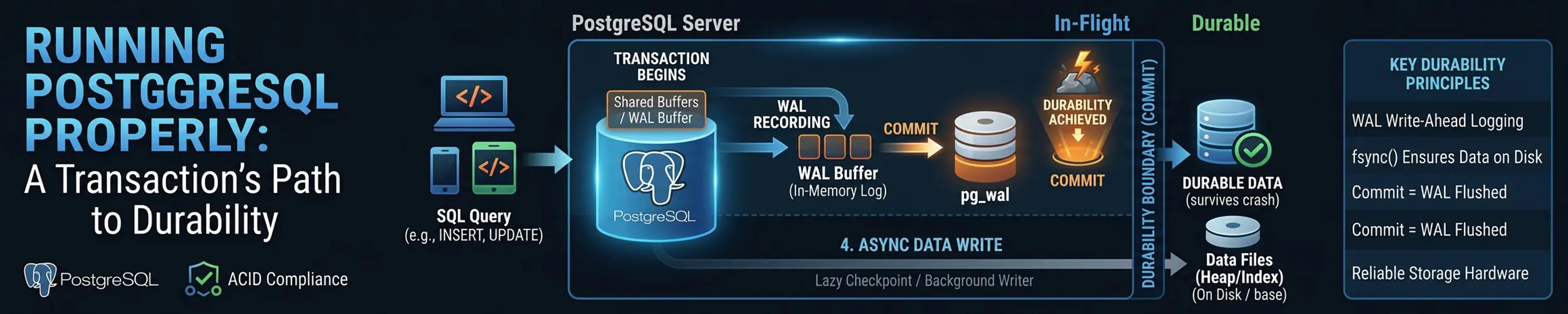
A reporting database, comfortable for a year, begins stalling: every few minutes everything hangs for twenty to forty seconds, disk utilisation sits at 100% during the stall and is modest between them, and the only change anyone can name is a nightly import that has roughly doubled. Someone has already “tuned checkpoints” from a well-regarded article, so checkpoints are crossed off the list. That is a stage 6 problem, and most PostgreSQL tuning advice — a list of settings with no argument attached — cannot place it. This page follows one transaction from the client to durable bytes, and every operational decision hangs off the stage it belongs to.
The most useful thing to know is that the client waits for exactly one of those eight stages. Everything after it is asynchronous, and that fact tells you which half of the system to stop investigating. This assumes PostgreSQL on your own Linux server — one server, one PostgreSQL, no automatic failover, clustering or sharding, and no query or index tuning, which mostly lives in EXPLAIN. If you have not set one up before, running a database covers installation and the first hour; this is what to do afterwards. A managed service takes stages 5 to 8 off your hands, which is most of the work on this page, and that is a legitimate reason to use one.
The eight stages. Every section below is one of them, in order.
- A connection becomes an operating-system process. One backend per client, forked by the postmaster.
- The change lands in shared buffers. A page in memory is modified and marked dirty. Nothing has touched the disk.
- A WAL record is built. Into WAL buffers — and the first change after a checkpoint writes the whole page.
COMMITflushes and fsyncs the WAL. This is the only thing the client waits for.- The WAL leaves the machine. Streamed to a standby, archived, or both.
- A checkpoint writes the data pages. Minutes later, in the background.
- Vacuum reclaims the old row versions and freezes the surviving ones.
- You restore it. Which is the only stage that proves any of the others worked.
The diagnostic hinge: the commit path ends at stage 4.
SELECT pid, state, wait_event_type, wait_event, left(query, 60)
FROM pg_stat_activity WHERE state <> 'idle';A COMMIT waits for the WAL to be flushed and never for a data page. So slow commits can only be caused by stages 1 to 4 — connections, buffers, WAL, the fsync. If commits are fast but the server periodically stalls, or reads are slow, or the disk is saturated with nobody obviously responsible, that is stages 5 to 7, which run in the background and cannot slow an individual commit no matter how badly they are configured. Two disjoint sets of causes, separated by one question.
Which version you are on, and a dated warning
PostgreSQL 18 is current, released 25 September 2025, with 18.6 out on 13 August 2026 (there is no 18.5 — it was skipped over a regression). PostgreSQL 19 is in beta, expected September or October 2026 without a committed date, so it may be out by the time you read this.
Supported majors are 14 through 18, five years each. Two dates matter more than the rest:
- PostgreSQL 13 went end-of-life on 13 November 2025. A great deal of writing still treats it as current.
- PostgreSQL 14 goes end-of-life on 12 November 2026. If you are on 14, that is weeks away, and
pg_upgradeis a planned afternoon rather than an emergency.
The old rule that distribution packages are hopelessly behind needs retiring. Ubuntu 26.04 ships PostgreSQL 18; Fedora 43 and 44 ship 18.6; Debian 13 ships 17; RHEL 10 shipped 16, with 18 available from 10.2. The PGDG repositories are still the right answer, but for a better reason: they carry every supported major at once, so you choose when to move.
Stage 1 — A connection becomes a process
PostgreSQL forks one operating-system process per connection — not a thread, not a slot in a pool — with its own address space, that must be created, scheduled and torn down. There is no built-in connection pooler and no threaded backend in any released version; the multithreading work has landed only preparatory refactoring with no target release. Anyone telling you PostgreSQL 18 is multithreaded is wrong.
That is why max_connections defaults to 100 and why raising it to 2,000 does harm rather than good: several shared-memory structures are sized from it, so the value is paid for at startup whether the connections exist or not, and every idle connection still costs a process.
-- What is actually connected, and how much of it is idle
SELECT state, count(*) FROM pg_stat_activity GROUP BY state;

-- Connections that have been idle in a transaction, which hold locks
-- and block vacuum
SELECT pid, now() - xact_start AS age, left(query, 60)
FROM pg_stat_activity
WHERE state = 'idle in transaction' ORDER BY age DESC;idle in transaction is the row to look at. A connection sitting in an open transaction holds its snapshot, which stops vacuum from removing any row version newer than it — a stage 1 problem that shows up as a stage 7 symptom. Set idle_in_transaction_session_timeout and stop guessing.
The fix for connection count is a pooler in front. PgBouncer is the usual choice, currently 1.25.2 (May 2026), and two things about it are widely out of date:
- It has supported prepared statements since 1.21.0, in October 2023 — including in transaction pooling mode. The standing advice to disable prepared statements in your driver is three years stale, and following it costs real throughput.
- It is still single-threaded, and multi-threading has not landed. To use more than one core, run several PgBouncer processes on the same port with
so_reuseport.
Transaction pooling is the mode worth having, and it breaks a specific list of things: session-level SET, LISTEN/NOTIFY, WITH HOLD cursors, advisory locks held across transactions, SET SESSION AUTHORIZATION, and temporary tables. Prepared statements are no longer on that list. Pgpool-II (4.7.2) does pooling plus load balancing and failover, and is correspondingly more to go wrong. Odyssey is multi-threaded, which is its reason to exist, but its release numbering is confusing enough that I could not establish which version is current — check before you deploy it.
Three security defaults belong here too. password_encryption has been scram-sha-256 since PostgreSQL 14, MD5 authentication is formally deprecated as of 18 and warns on CREATE ROLE, and PostgreSQL 19 removes RADIUS entirely. Hardening a service covers the rest of the surface.
Stage 2 — The change lands in shared buffers
An UPDATE does not write to disk. It finds the page in shared buffers — PostgreSQL’s own cache in shared memory — modifies it there, and marks it dirty. If the page is not already cached it is read in first: the only disk access in this stage, and a read.
| Setting | Default | What it actually is |
|---|---|---|
shared_buffers | 128MB | Memory PostgreSQL allocates and manages itself |
effective_cache_size | 4GB | A planner hint. Allocates nothing at all |
work_mem | 4MB | Per sort or hash, per node, per query — multiplies fast |
maintenance_work_mem | 64MB | Vacuum, index builds, ALTER TABLE |
random_page_cost | 4.0 | Planner cost ratio, not a hardware measurement |
effective_io_concurrency | 16 | Was 1 before PostgreSQL 18 |
The 25% rule for shared_buffers is documented, not folklore — the manual calls it a reasonable starting value on a dedicated server with a gigabyte or more. Treat it as a start, not a target: the operating system’s page cache does real work for PostgreSQL, and giving all the memory to one of the two caches is not obviously better than splitting it.
random_page_cost is where the most confidently repeated advice has quietly stopped matching the documentation. The old reasoning was rotational: seeks are expensive, so lower it to 1.1 on SSD. The current manual justifies the 4.0 default differently — random access is more than four times as expensive, but most random reads are assumed to be cached, and network-attached storage narrows the gap. On that reasoning you raise it when caching is worse than assumed and lower it when the database fits in RAM; “I am on SSD, so 1.1” is no longer the argument the documentation makes.
work_mem is the one that takes machines down. It is per sort or hash node, not per query, so one query with several of them, run by fifty connections, multiplies into far more memory than you intended. Start at 16MB or 32MB on a busy server, raise it for specific reports with a session-level SET, and read memory, swap and the OOM killer before you find out the hard way.
Huge pages are worth setting up and the calculation is not a guess. Ignore the old “divide shared_buffers by 2MB and add ten per cent” arithmetic; PostgreSQL computes the number for you:
postgres -D $PGDATA -C shared_memory_size_in_huge_pages   # e.g. 3170
sysctl -w vm.nr_hugepages=3170

-- huge_pages defaults to 'try', which fails silently. Verify:
SHOW huge_pages_status; -- 'on', 'off' or 'unknown' (PostgreSQL 17+)The usual companion advice — disable transparent huge pages — is not in the PostgreSQL documentation anywhere. It is practitioner experience, widely held and probably right, but treat it as such rather than as project guidance.
The kernel setting the manual does insist on is overcommit. vm.overcommit_memory=2 makes the OOM killer far less likely, and the manual gives the exact mechanism for protecting the postmaster: an oom_score_adj of -1000 for it, with PG_OOM_ADJUST_FILE and PG_OOM_ADJUST_VALUE putting the child backends back to normal. The kernel may kill a backend; a killed postmaster takes the whole cluster with it.
Stage 3 — The WAL record, and the full page you did not expect
Before the dirty page can ever be written, a record describing the change goes into the write-ahead log buffers. This is the ordering the whole system rests on: the log describing a change is made durable before the change itself, so a crash can be replayed forward.
The surprise is full_page_writes, on by default. The first time a page is modified after each checkpoint, PostgreSQL writes the entire 8KB page into the WAL rather than just the change — protection against a torn page, a partial write during a crash that row-level records cannot repair because they assume the rest of the page is intact. Two consequences follow, and the second is the one that bites.
- WAL volume spikes immediately after every checkpoint and tapers off until the next one. Frequent checkpoints therefore mean permanently high WAL volume, which is the feedback loop in the worked diagnosis below.
- You cannot safely turn it off on the strength of “my storage does atomic writes”. The documentation describes what the setting protects against but endorses no storage class as safe, and gives no list. Anyone telling you it is fine to disable on NVMe or ZFS is going beyond what upstream will say.
What you can do is compress those full-page images. wal_compression defaults to off and accepts pglz, lz4 or zstd — the latter two since PostgreSQL 15, if the build supports them. It compresses only full-page images, precisely the part that spikes, without increasing corruption risk; on a write-heavy server lz4 is close to free.
Stage 4 — COMMIT: the one fsync the client waits for
At COMMIT, PostgreSQL flushes the WAL buffers and calls fsync on the WAL segment; only when that returns is the commit acknowledged. This is the entire durability guarantee, and the only synchronous disk operation in the transaction. The modified data page is still sitting dirty in memory and will be for minutes. The life of a write follows that fsync down through the page cache, the block layer and the drive’s own cache — everything below PostgreSQL can also lie to it.
synchronous_commit controls how much of that you wait for. It takes exactly five values:
| Value | Waits for | You lose, on a crash |
|---|---|---|
remote_apply | Local fsync, and the standby to apply | Nothing, and reads on the standby are current |
on (default) | Local fsync, and the standby to fsync | Nothing |
remote_write | Local fsync, standby to write only | Data if the standby’s OS crashes too |
local | Local fsync only | Data only if you fail over |
off | Nothing | Up to three times wal_writer_delay |
There is no remote_flush. It appears in a lot of write-ups and it is not a value; the remote-flush guarantee is what on means. The standby columns only apply when synchronous_standby_names is set — without it, on is a local flush.
synchronous_commit = off is a bounded, honest trade and fsync = off is not. They look like neighbouring settings and are not remotely comparable. With asynchronous commit the risk window is documented as three times wal_writer_delay — 600 milliseconds at the default — and the failure mode is losing those last transactions; the database is still consistent. With fsync = off the manual’s word is “unrecoverable data corruption”: a broken cluster. It is defensible for an initial bulk load or a throwaway clone, and nowhere else.
It is also per-transaction, which is the useful part. Leave the cluster on on and relax it where the data genuinely does not matter:
BEGIN;
SET LOCAL synchronous_commit = off;   -- this transaction only
INSERT INTO event_log ...;
COMMIT;

-- What method is actually being used for the fsync?
SHOW wal_sync_method;   -- fdatasync on Linux
-- And compare them on your hardware:
-- pg_test_fsyncwal_sync_method has defaulted to fdatasync on Linux for as long as any supported version goes back — the advice to “switch from open_datasync” describes a default that was never Linux’s. pg_test_fsync tells you whether another method is faster on your storage: a measurement, not a rule.
PostgreSQL 18 also added an asynchronous I/O subsystem, and the press coverage got the default wrong. io_method defaults to worker, not sync — asynchronous I/O is on out of the box, and the parameter can only be set at server start. The third value, io_uring, needs a build with --with-liburing and carries a trap: the documentation implies Linux 5.1, but the operations PostgreSQL uses arrived in 5.6. Below 5.1 it fails cleanly at startup; on 5.1 to 5.5 the server starts and then every connection fails with an invalid-argument error on a read.
For containers: Docker has blocked the io_uring syscalls in its default seccomp profile since 25.0.0, but the official postgres image is not built with liburing, so io_method=io_uring is rejected as an invalid value before any syscall happens — and the default is worker regardless. Stock PostgreSQL in a container is unaffected. Containers, all the way down covers why that seccomp profile exists.
Stage 5 — The WAL leaves the machine
A durable commit on one machine survives a crash. It does not survive the machine, and stage 5 — copying the WAL somewhere else — is the difference between a database and a database you still have. Two mechanisms, and you generally want both: streaming replication sends WAL to a standby continuously, and archiving copies completed segments somewhere durable, which is what makes point-in-time recovery possible. Set archive_mode = on and then exactly one of:
archive_command— a shell command per segment. It is not deprecated. That claim circulates widely and there is no deprecation notice anywhere upstream.archive_library— an archive module, added in PostgreSQL 15, which avoids forking a shell for every segment. An alternative, not a replacement.
Setting both is an error since PostgreSQL 16. And whichever you use, the command must return non-zero when it fails — an archive command that silently succeeds while writing nothing produces a backup chain with holes in it that you will discover during a restore.
Logical replication is a different tool with stable, important restrictions. It does not replicate DDL, and it does not replicate sequence values — neither, in any released version. PostgreSQL 19’s beta adds sequence values; DDL has no committed plan. If you have read that logical replication “handles schema changes now”, it does not.
-- Is the standby actually keeping up, and by how much?
SELECT client_addr, state, sent_lsn, write_lsn, flush_lsn, replay_lsn,
       pg_wal_lsn_diff(sent_lsn, replay_lsn) AS replay_lag_bytes
FROM pg_stat_replication;

-- Slots that nobody is consuming will fill your disk with WAL
SELECT slot_name, active, wal_status, inactive_since
FROM pg_replication_slots;An inactive replication slot is one of the few ways to fill a PostgreSQL disk from nothing. The slot’s job is to stop WAL being removed until the consumer has it, so a standby switched off for a fortnight is silently pinning every segment since. Check wal_status and inactive_since; PostgreSQL 18 added idle_replication_slot_timeout so the server can clean up after you.
Stage 6 — The checkpoint writes the data pages
Minutes after the client got its acknowledgement, a checkpoint writes every dirty data page to disk and records a point in the WAL from which recovery can begin. Nothing waits for it, which is exactly why a badly configured checkpoint produces a server that is fast until it periodically is not.
| Setting | Default | Note |
|---|---|---|
checkpoint_timeout | 5min | Almost always too short; 15–30 minutes is common |
max_wal_size | 1GB | The one that actually forces checkpoints |
min_wal_size | 80MB | Segments recycled rather than deleted |
checkpoint_completion_target | 0.9 | Default since PostgreSQL 14 — setting it is a no-op |
log_checkpoints | on | Default since PostgreSQL 15 |
A checkpoint happens either because checkpoint_timeout elapsed — timed, which is what you want — or because WAL volume hit max_wal_size — requested, which means the server is being forced into checkpoints faster than it planned. Requested checkpoints are the most common self-inflicted stall on a write-heavy PostgreSQL, and the ratio is one query away.
SELECT num_timed, num_requested, write_time, sync_time, buffers_written
FROM pg_stat_checkpointer;That query is new, and the one you have seen everywhere else no longer runs. SELECT checkpoints_timed, checkpoints_req FROM pg_stat_bgwriter — the query in essentially every checkpoint-tuning article written before 2024 — fails outright on PostgreSQL 17 and 18. The columns moved to pg_stat_checkpointer and were renamed: num_timed, num_requested, buffers_written.
If num_requested is a meaningful fraction of num_timed, raise max_wal_size — several gigabytes is unremarkable on a busy server — and lengthen checkpoint_timeout. The cost is a longer crash recovery, because recovery replays from the last checkpoint: steadier running against a slower start after a crash.
Stage 7 — Vacuum, freezing and wraparound
An UPDATE in PostgreSQL does not overwrite a row; it writes a new version and leaves the old one for readers that still need it. A DELETE only marks. Vacuum is what eventually reclaims those dead versions, and autovacuum is what runs it for you.
Autovacuum triggers on a formula, not a schedule: it vacuums a table when dead tuples exceed threshold + scale_factor × rows. With the defaults of 50 and 0.2 that is twenty per cent of the table — fine at a thousand rows, absurd at a hundred million, where you wait for twenty million dead tuples before anything happens. Lowering the scale factor on your largest tables individually is the highest-value vacuum change most people can make.
ALTER TABLE events SET (autovacuum_vacuum_scale_factor = 0.02,
                        autovacuum_vacuum_threshold  = 5000);

-- Which tables are actually accumulating dead rows?
SELECT relname, n_live_tup, n_dead_tup, last_autovacuum, autovacuum_count
FROM pg_stat_user_tables
WHERE n_dead_tup > 10000 ORDER BY n_dead_tup DESC;

-- What is a running vacuum doing right now?
SELECT pid, relid::regclass, phase, heap_blks_scanned, heap_blks_total
FROM pg_stat_progress_vacuum;Two pieces of long-standing vacuum advice have expired. autovacuum_vacuum_cost_delay has defaulted to 2ms since PostgreSQL 12, not the 20ms that throttled vacuum to uselessness on fast storage. And the “no point setting maintenance_work_mem above 1GB” rule was true through PostgreSQL 16 and is false from 17, which replaced vacuum’s fixed dead-tuple array with a structure that is no longer silently capped; on 17 and later, more memory helps on large tables.
For measuring bloat honestly, pgstattuple is still the right extension — exact, at the cost of a full table scan, with pgstattuple_approx() when that is too expensive. The widely copied bloat query from the project wiki is an estimate built on planner statistics: fine for alerting, not a number to quote.
Transaction ID wraparound is the failure mode that ends with a database refusing writes. Transaction IDs are 32-bit and compared circularly, so rows must be frozen before their age approaches two billion. Autovacuum force-runs for this even on tables where you disabled it. At roughly 40 million transactions remaining the server warns; at about 3 million it stops issuing new transaction IDs.
Do not stop the server and go into single-user mode. This is the most dangerous piece of stale PostgreSQL advice in circulation, and the documentation now says so explicitly: it is “not necessary or desirable”, it is riskier because single-user mode disables the wraparound safeguards that exist to prevent data loss, and it takes the system down for no benefit.
The server has not shut down. It is refusing to assign new transaction IDs; reads continue, and VACUUM runs normally. The documented procedure, in order:
SELECT * FROM pg_prepared_xacts;      -- 1. commit or roll back stragglers
SELECT pid, age(backend_xid), query   -- 2. end long-running transactions
  FROM pg_stat_activity WHERE backend_xid IS NOT NULL
  ORDER BY age(backend_xid) DESC;
SELECT slot_name, active FROM pg_replication_slots;  -- 3. drop stale slots

VACUUM; -- 4. plain VACUUM. Not VACUUM FULL, not VACUUM FREEZE.VACUUM FULL is actively wrong here — it needs a transaction ID of its own, which is the resource you have run out of. And a prepared transaction, a forgotten idle in transaction session, or an abandoned replication slot is nearly always the actual cause, because each one pins the horizon that vacuum is allowed to clean past.
64-bit transaction IDs would end this class of problem. They are not close: the patch was returned with feedback, last touched in 2024, with no target version. Plan around wraparound existing.
Stage 8 — The restore you have rehearsed
Everything above is machinery for producing bytes you can get back, and a backup you have never restored is a hypothesis. Point-in-time recovery is a base backup plus every WAL segment since: restore the base backup, clear pg_wal/, set restore_command and a recovery target in postgresql.conf, and create the signal file:
# postgresql.conf
restore_command = 'cp /archive/%f %p'
recovery_target_time = '2026-09-02 14:30:00+01'
recovery_target_action = 'promote'

# then, in the data directory:
touch $PGDATA/recovery.signal    # targeted recovery
# touch $PGDATA/standby.signal # standby mode; mutually exclusiverecovery.conf has not existed since PostgreSQL 12 — these are ordinary settings now. Targets are recovery_target_time, _xid, _lsn, _name, or recovery_target = 'immediate'.
Two more removals break old scripts outright. pg_start_backup() and pg_stop_backup() became pg_backup_start() and pg_backup_stop() in PostgreSQL 15, and exclusive backup mode was removed along with pg_backup_start_time() and pg_is_in_backup() — any hand-rolled backup script from before 2022 is now broken. Similarly, a copied postgresql.conf containing promote_trigger_file (removed in 16), old_snapshot_threshold (17), stats_temp_directory (15) or vacuum_defer_cleanup_age (16) will stop the server starting, because an unknown parameter is fatal.
pg_basebackup is fine, and PostgreSQL 17 gave it --incremental with pg_combinebackup to reassemble. But note the documented gap: PostgreSQL does not track which backups an incremental chain depends on. You do. That sentence is the strongest argument for a real backup tool:
| Tool | Current | Where it fits |
|---|---|---|
| pgBackRest | 2.59.1, Aug 2026 | The default recommendation. Very actively maintained |
| Barman | 3.18.0 | EDB-maintained; moving toward a unified cloud model |
| WAL-G | 3.0.8 | Maintained, slower cadence; strong object-storage story |
| pg_probackup | 2.5.16 | Maintained; note a separate commercial 3.x line exists |
pg_dump | — | Schema, single tables, migrations, small databases. Not PITR |
A warning about researching this yourself: a cluster of recent, high-ranking, apparently machine-generated articles makes false maintenance claims about these projects — including one asserting pgBackRest is unmaintained, which shipped a release in August 2026. Check the project’s own release page.
Major upgrades are still pg_upgrade; run --check first with the same mode flags you intend to use. PostgreSQL 18 carries statistics across by default, added a fast --swap mode that destructively modifies the old cluster — no fallback — and enabled data checksums by default on new clusters, so upgrading from an older cluster without them needs --no-data-checksums. For lower downtime, pg_createsubscriber (PostgreSQL 17) converts a physical standby into a logical replica.
On filesystems, the project declines to take a side and says so plainly: do not expect major performance or behaviour changes merely from switching. There is no upstream recommendation for or against ext4, XFS, ZFS or Btrfs, and nothing about copy-on-write — so “avoid Btrfs” is engineering judgement rather than documentation, and I present it as mine. Two concrete points do exist: pg_upgrade --clone needs reflink support, which on Linux means XFS or Btrfs; and for NFS, mount hard and make sure the server exports with sync, or a client-side fsync is not guaranteed to reach storage.
A worked diagnosis
Back to the reporting database from the top of the page: stalling for twenty to forty seconds every few minutes, disk at 100% during the stalls, a nightly import roughly doubled in size, and nothing else changed.
The hinge first. Individual COMMITs were timed and were fine — single-digit milliseconds, even during a stall. That eliminates stages 1 to 4 outright. Whatever this was, it was background work, and the background work that writes data pages is the checkpoint.
=> SELECT num_timed, num_requested FROM pg_stat_checkpointer;
 num_timed | num_requested
-----------+---------------
288 | 4192Fourteen forced checkpoints for every scheduled one. max_wal_size was at its 1GB default, so the import was generating a gigabyte of WAL every few minutes and forcing a checkpoint each time.
And the loop is worse than it first appears, because of stage 3. Every checkpoint resets the full-page-write cycle: the next modification to each page writes the entire 8KB page into the WAL. More checkpoints means more full pages, more WAL, max_wal_size reached sooner, another forced checkpoint. The server had tuned itself into a feedback loop, and the import merely pushed it over the threshold where the loop closed.
The fix was two settings and no application change: max_wal_size = 16GB and checkpoint_timeout = 30min, giving checkpoints room to be timed and spread out, plus wal_compression = lz4 to take the edge off the full-page images. The ratio inverted within an hour and the stalls stopped.
The detail worth keeping is what had been done before anyone looked. Someone had already “tuned checkpoints” by setting checkpoint_completion_target = 0.9 from a well-regarded 2019 article. That has been the default since PostgreSQL 14, so the change did precisely nothing — and because a change had been made, checkpoints were crossed off the list for two weeks. Stale advice does not just fail to help; it convinces you a stage has been ruled out.
Where things go wrong, by stage
| Symptom | Stage | Likely cause | Where to look |
|---|---|---|---|
| “too many clients already” | 1 | No pooler, or an application leaking connections | pg_stat_activity grouped by state |
| Memory exhausted with few queries running | 1 | work_mem × nodes × connections | SHOW work_mem; count backends |
| Prepared statements fail behind a pooler | 1 | PgBouncer older than 1.21.0 | SHOW VERSION in PgBouncer |
| Vacuum never reclaims anything | 1 | A session stuck idle in transaction | backend_xid in pg_stat_activity |
| Queries slow only after a restart | 2 | Cold shared buffers; nothing is wrong | Wait, or pg_prewarm |
| Server killed by the kernel | 2 | Overcommit and the OOM killer | vm.overcommit_memory; dmesg |
| WAL volume far larger than data written | 3 | Full-page writes after frequent checkpoints | pg_stat_checkpointer |
| Commits slow, everything else fine | 4 | WAL fsync latency, or a synchronous standby | wait_event; pg_test_fsync |
| Data lost after a crash, cluster intact | 4 | synchronous_commit = off | SHOW synchronous_commit |
| Cluster corrupt after a power cut | 4 | fsync = off, or storage lying about flushes | SHOW fsync; the drive’s write cache |
| Disk fills with WAL and nothing frees it | 5 | An inactive replication slot, or archiving failing | pg_replication_slots.wal_status |
| Restore has gaps in the WAL sequence | 5 | archive_command returning zero on failure | Test it by hand; check exit codes |
| Standby has stale schema | 5 | Logical replication does not replicate DDL | Compare with pg_dump --schema-only |
| Periodic stalls, individual commits fast | 6 | Requested checkpoints from max_wal_size | num_requested vs num_timed |
| Crash recovery takes a very long time | 6 | The price of long checkpoint intervals | The recovery log |
| Tables far larger than their row count | 7 | Bloat; autovacuum’s 20% threshold | pgstattuple; n_dead_tup |
| Indexes used less over time | 7 | Bloat, or statistics never analysed | pg_stat_user_tables.last_autoanalyze |
| “database is not accepting commands” | 7 | Transaction ID wraparound | Prepared transactions, slots, long transactions |
| Vacuum runs constantly and never finishes | 7 | Cost limits, or a horizon it cannot clean past | pg_stat_progress_vacuum |
| Backup restores, database is inconsistent | 8 | File copy without WAL, or a broken archive | Rehearse the restore |
| Incremental backup cannot be reassembled | 8 | Nothing tracks the chain but you | Use a backup tool |
| An old backup script fails on a new server | 8 | pg_start_backup() was renamed in 15 | pg_backup_start() |
| Server will not start after a config copy | 8 | A parameter removed in a later version | The startup log |
Before you call it done
- You have restored a backup onto a different machine and connected something to it. Not checked that the backup ran — restored it.
num_requestedinpg_stat_checkpointeris a small fraction ofnum_timed.- Your largest tables have their own
autovacuum_vacuum_scale_factor, not the 20% default. - Nothing sits
idle in transactionindefinitely, andidle_in_transaction_session_timeoutis set. - Every replication slot has a live consumer, and you know what happens when one stops.
- The archive command fails loudly. You have tested that by breaking it on purpose.
fsyncison, and you know whether your storage honours a flush.- You are on a supported major version, with the next upgrade in the calendar rather than in your head.
- Something alerts on transaction age, disk free space and replication lag — see simple monitoring.
The first item is the only one that is not optional. Every other line on this page is machinery for making it possible.
Related reading
- Running a database — installation, users and the first hour
- The life of a write — what happens to that
fsyncbelow PostgreSQL - Automated backups — the scheduling and retention side
- Memory, swap and the OOM killer — why
work_memis dangerous - Containers, all the way down — if this is going in a container
- Hardening a service — the surface around the database
- A staging environment — where to rehearse the restore
- journalctl — reading the logs when it will not start