

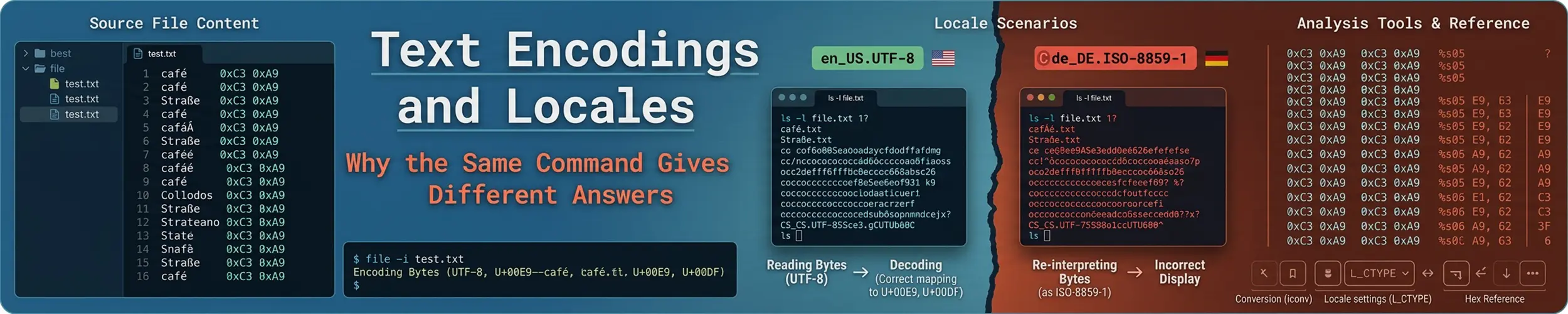
A text file on Linux is a sequence of bytes. Nothing anywhere records which encoding those bytes are in — no header, no metadata, no filesystem attribute. Every program that reads the file guesses, usually by consulting your locale settings, and when two programs guess differently you get the class of problems this page is about.
Filenames are bytes too
Worth stating early, because it surprises people: the kernel treats a filename as a string of bytes with only two rules — no null, no slash. It has no idea whether those bytes are UTF-8, Latin-1 or noise.
That is why a file copied from an old system can show as caf??.txt in ls while still opening perfectly, and why a filename can be un-typeable in your terminal but entirely valid on disk. Tab completion and shell globs handle it; copying and pasting the name does not.
ls | cat -v                     # show the actual bytes
find . -name '*'$'\303\251''*'  # match a specific byte sequence
convmv -f latin1 -t utf8 -r . # rename files into UTF-8 (dry run by default)UTF-8, briefly
UTF-8 encodes each character in one to four bytes, and the first 128 are exactly ASCII. That backward compatibility is why the transition to Unicode happened at all: every ASCII file was already valid UTF-8, so nothing had to be converted.
The consequence is that bytes and characters are no longer the same count, and tools differ on which they mean:
printf 'caf\xc3\xa9' | wc -c     # 5 bytes
printf 'caf\xc3\xa9' | wc -m     # 4 characters
echo -n 'é' | hexdump -C # c3 a9 — two bytes, one characterFixed-width field extraction with cut -c counts characters in a UTF-8 locale and bytes in the C locale, which is a quiet way for a working script to start truncating names halfway through a letter.
What the locale variables control
locale                # what is in effect now
locale -a             # what is available on this machine
locale -a | wc -l # on a minimal container, often close to 1| Variable | Decides |
|---|---|
LC_CTYPE | Which bytes are letters; case conversion; the encoding |
LC_COLLATE | Sort order — the one that causes real trouble |
LC_NUMERIC | Decimal point: 1.5 or 1,5 |
LC_TIME | Date format and day names |
LC_MESSAGES | What language errors appear in |
LANG | The default for all of the above |
LC_ALL | Overrides every one of them. For temporary use only |
Precedence runs LC_ALL → the specific LC_* → LANG. Setting LC_ALL permanently in a profile is a bad habit, because it silently overrides every later attempt to change one category.
The misreading: your locale changes what commands do
sort does not sort by byte value — it sorts by your locale’s collation rules. In most language locales that means punctuation and case are largely ignored, so apple, Apple and _apple interleave rather than grouping. The same script run on your laptop and on a server with a different LANG produces genuinely different output, and any downstream comm, join or uniq silently misbehaves because those tools assume a consistent order. Put LC_ALL=C in front of sort in any script whose output another program consumes. It is also considerably faster.
printf 'b\nA\na\nB\n' | sort                 # locale order: a A b B
printf 'b\nA\na\nB\n' | LC_ALL=C sort # byte order: A B a bThe same applies to character ranges in grep and sed: [a-z] is a collation range, not a byte range, so in some locales it matches uppercase letters too. Use named classes such as [[:lower:]] when you mean the category, and LC_ALL=C when you mean the bytes.
The SSH warning everyone has seen
-bash: warning: setlocale: LC_CTYPE: cannot change locale (en_GB.UTF-8)
perl: warning: Falling back to the standard locale ("C")This is not a broken server. Your SSH client is configured to forward your locale variables — SendEnv LANG LC_* is on by default in most distributions — and the remote machine does not have that locale installed. It falls back to C, and then complains on every login.
Two honest fixes. Install the locale on the server, or stop sending yours:
# on the server, Debian family
sudo sed -i 's/^# *en_GB.UTF-8/en_GB.UTF-8/' /etc/locale.gen
sudo locale-gen

# on the server, Fedora family
sudo dnf install glibc-langpack-en

# or, on your client, in ~/.ssh/config
Host oldserver
SendEnv -LC_* -LANGIt matters more than the cosmetics suggest: a shell that fell back to C will mangle non-ASCII output and sort differently from the one you tested in.
Guessing an encoding, and converting
file -i data.csv                       # its best guess at charset
file data.csv                          # also spots CRLF line endings
iconv -f latin1 -t utf8 old.txt > new.txt
iconv -f utf8 -t ascii//TRANSLIT       # é becomes e rather than failing
iconv -f utf8 -t utf8 file >/dev/null  # is it valid UTF-8 at all?
dos2unix file.txt                      # or: tr -d '\r' < f > f2
file -i is guessing, not reading metadata — there is none to read. It is reliable at distinguishing valid UTF-8 from something else, because invalid byte sequences are easy to spot, and unreliable at telling Latin-1 from the other single-byte encodings, because they are all just bytes.
That fourth line is the useful trick: iconv from UTF-8 to UTF-8 succeeds only if the input really is valid UTF-8, which turns “is this file corrupt” into a yes-or-no question with an exit code.
Mojibake, and how to read it
| What you see | What happened |
|---|---|
café | UTF-8 bytes displayed as Latin-1 |
caf? or caf� | Non-ASCII bytes the tool could not decode |
café with extra marks | Double-encoded — UTF-8 converted to UTF-8 twice |
caf\xc3\xa9 | Correct bytes, shown escaped by a tool in byte mode |
A leading | A UTF-8 byte-order mark, which Unix tools do not expect |
The last is a real nuisance: a file exported from a Windows spreadsheet often begins with a BOM, and that invisible three-byte prefix attaches itself to your first column header, breaking every comparison against it. sed -i '1s/^\xEF\xBB\xBF//' file removes it.
C, C.UTF-8 and the container problem
| Locale | Encoding | Sort order | Good for |
|---|---|---|---|
C / POSIX | ASCII only | Byte value | Scripts — but it mangles non-ASCII output |
C.UTF-8 | UTF-8 | Byte value | Servers and containers |
en_GB.UTF-8 | UTF-8 | Language rules | Interactive use by a person |
C.UTF-8 is the sweet spot for anything non-interactive: text handled correctly, order predictable, no language data required. Minimal container images frequently ship with no locales at all, and Python, Java and Perl then throw encoding errors on the first non-ASCII byte. One line in the image fixes it:
ENV LANG=C.UTF-8To change it on a real machine, set it once rather than scattering exports through shell startup files:
localectl status
sudo localectl set-locale LANG=en_GB.UTF-8Symptoms and causes
| Symptom | Cause |
|---|---|
| Same script, different sort output on two machines | LC_COLLATE. Use LC_ALL=C |
Accented characters become é | UTF-8 read as a single-byte encoding |
| Numbers parse wrongly in a script | LC_NUMERIC — comma versus point |
| Locale warnings on SSH login | Forwarded locale missing on the server |
| Python or Java encoding errors in a container | No locale in the image; set LANG=C.UTF-8 |
| First CSV column never matches | A byte-order mark |
cut -c splits a letter in half | Bytes versus characters |
| A filename that cannot be typed | It is bytes, not text — use tab completion |
Related
- sort, uniq, cut and the rest — where collation order changes the answer
- What a Shell Actually Is — where environment variables are set, and which file runs when
- Containers — minimal images and what they leave out
- ssh —
SendEnvand the client configuration file