

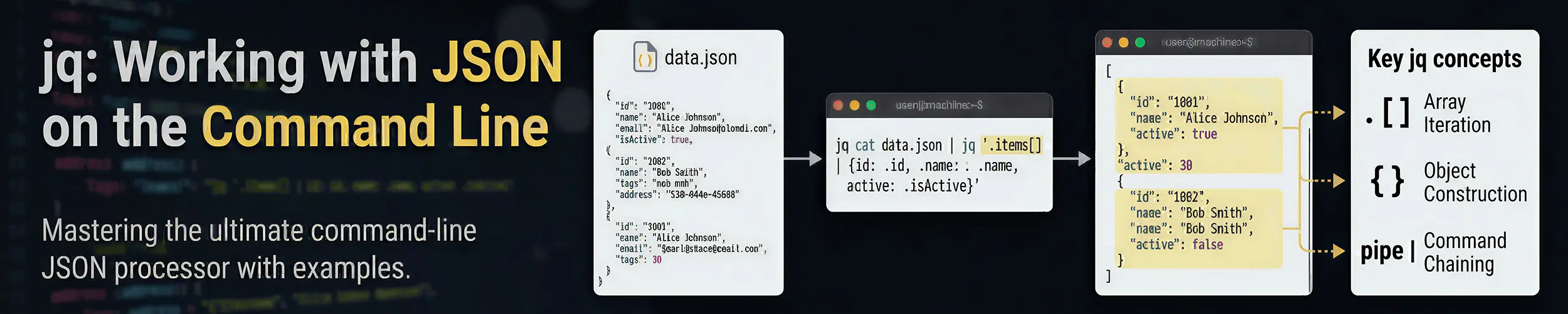
The classic Unix text tools all assume the same thing: your data is lines, and fields are separated by spaces or commas. grep, awk, cut and sed are all built on that assumption, and it held for thirty years.
JSON breaks it completely. It is nested, it does not care about line breaks, and a value can contain the characters you were about to split on. Trying to pull a field out of an API response with grep works right up until it silently does not, which is worse than failing.
jq is the tool that fills the gap. It parses JSON properly and lets you query it in a pipeline, which makes it one of the few genuinely new command-line tools of the last decade rather than a nicer version of something old.
Is it worth your time?
Yes, if you ever touch an API from the shell. Cloud CLIs, container tooling, monitoring endpoints, webhooks and half of modern infrastructure speak JSON. Thirty minutes with jq pays back permanently.
You need about five filters, not the whole language. jq has a complete functional programming language inside it and you can ignore almost all of it.
Skip it if your work never leaves log files and config files. awk already covers that ground.
sudo apt install jq          # Debian, Ubuntu
sudo dnf install jq          # Fedora, RHEL, Rocky, Alma
sudo pacman -S jq            # Arch
brew install jq # macOSIt is a single small binary with no dependencies, which makes it easy to justify on any machine that talks to an API.
The one that does most of the work
Before any filtering, jq earns its place just by making JSON readable:
# Pretty-print and colour anything
curl -s https://api.example.com/status | jq

# Same thing, explicitly - '.' means "the whole document"
curl -s https://api.example.com/status | jq '.'A minified API response is an unreadable wall. | jq turns it into something you can actually look at, and that alone is worth the install. Everything below is refinement on top of it.
The five filters worth learning
jq works by piping a document through filters, in the same spirit as a shell pipeline. These five cover the overwhelming majority of real use.
| Filter | Does |
|---|---|
.field | Pick one key |
.[] | Loop over an array |
select(...) | Keep only matching items |
{a, b} | Build a smaller object |
-r | Output raw strings, without quotes |
Working against a response that looks like this:
{
  "servers": [
    {"name": "web-01", "status": "running", "cpu": 12, "region": "eu"},
    {"name": "web-02", "status": "stopped", "cpu": 0,  "region": "eu"},
    {"name": "db-01",  "status": "running", "cpu": 78, "region": "us"}
  ]
}# One key
jq '.servers' data.json
# Every element of the array, separately
jq '.servers[]' data.json
# One field from every element
jq '.servers[].name' data.json
# "web-01"
# "web-02"
# "db-01"
# Without the quotes - what you want for a shell loop
jq -r '.servers[].name' data.json
# web-01
# web-02
# db-01
# Only the running ones
jq -r '.servers[] | select(.status == "running") | .name' data.json
# Only the busy ones
jq -r '.servers[] | select(.cpu > 50) | .name' data.json
# A smaller object with just the fields you care about
jq '.servers[] | {name, cpu}' data.json
# As a table, for humans
jq -r '.servers[] | [.name, .status, .cpu] | @tsv' data.json-r is the flag you will forget and then need. Without it every string comes out wrapped in double quotes, which is correct JSON and completely wrong for feeding into another command. If a shell loop is behaving as though your hostnames contain quote marks, that is why.
The @tsv line is the bridge back to the classic tools: it converts JSON into tab-separated columns, at which point awk, sort and column -t all work normally again.
Real things you will actually do
# Which containers are running?
docker inspect $(docker ps -q) | jq -r '.[] | .Name'

# Every environment variable from a container
docker inspect mycontainer | jq -r '.[0].Config.Env[]'

# systemd journal as JSON, filtered
journalctl -u nginx -o json --since "1 hour ago" \
  | jq -r 'select(.PRIORITY <= "3") | .MESSAGE'

# Pull one value out of an API response into a variable
TOKEN=$(curl -s -X POST https://api.example.com/login \
  -d '{"user":"me"}' | jq -r '.token')

# Count things
curl -s https://api.example.com/servers | jq '.servers | length'

# Sort and take the top five
curl -s https://api.example.com/servers \
| jq -r '.servers | sort_by(-.cpu) | .[:5] | .[] | .name'That journalctl -o json | jq combination is worth knowing about. The journal has far more fields than the default output shows — the unit, the PID, the source file, the priority — and JSON output plus jq lets you filter on any of them. Reading Linux logs covers the ordinary way; this is the version for when you need something the normal flags cannot express.
Things that catch people out
| Symptom | Cause |
|---|---|
| Output has quotes around it | Missing -r |
Cannot index array with "name" | You need .[] before the field |
null instead of a value | The key does not exist — check spelling and case |
| Shell mangles the filter | Use single quotes around the jq expression |
| Nothing at all | Input was not valid JSON — check with jq . file |
| Fails on multiple documents | Use -s to slurp them into one array |
| Key has a dash or space | Quote it: .["my-key"] |
Always single-quote your filter. jq syntax is full of characters the shell wants to interpret — $, |, *, > — and double quotes let the shell get to them first. Single quotes hand the whole expression to jq untouched, which is what you want every time.
The null case deserves a note too. jq returns null for a missing key rather than erroring, which is convenient until a typo silently produces empty output. If a filter returns nothing, check the key names against jq 'keys' before assuming your syntax is wrong.
Where jq is not the answer
- YAML. jq does not read it. Use
yq, which is deliberately jq-compatible, so the filters you learn here transfer directly to Kubernetes manifests and Ansible files. - Anything genuinely complicated. jq has a full language and you can write remarkable things in it. You should not. Once a filter needs its own line breaks and a comment to explain it, a ten-line Python script is more readable and far easier to fix in six months.
- Plain text and logs. That is grep and awk territory, and they are better at it.
- Huge documents. jq loads the whole thing into memory by default. For very large files,
--streamexists but is awkward enough that a real programming language is usually the better answer.
The honest summary: jq is superb at extracting a value and reshaping a structure, and it is a poor language for logic. Keep your filters short and let the shell or a script do the thinking.
Quick reference
| You want | Filter |
|---|---|
| Make it readable | jq |
| One key | jq '.name' |
| Every array element | jq '.[]' |
| A field from each | jq -r '.[].name' |
| Filter by a condition | jq '.[] | select(.cpu > 50)' |
| Pick some fields | jq '.[] | {name, status}' |
| Columns for other tools | jq -r '.[] | [.a,.b] | @tsv' |
| Count | jq 'length' |
| What keys exist? | jq 'keys' |
| Combine several documents | jq -s '.' |
| Is this valid JSON? | jq . file > /dev/null |
Related reading
- curl and wget — getting the JSON in the first place
- awk — the equivalent for column-shaped text
- Reading Linux logs — and
journalctl -o json - Getting started with Docker —
docker inspectreturns JSON - grep — and why it is the wrong tool for this
- Command line basics — quoting, which matters a great deal here