

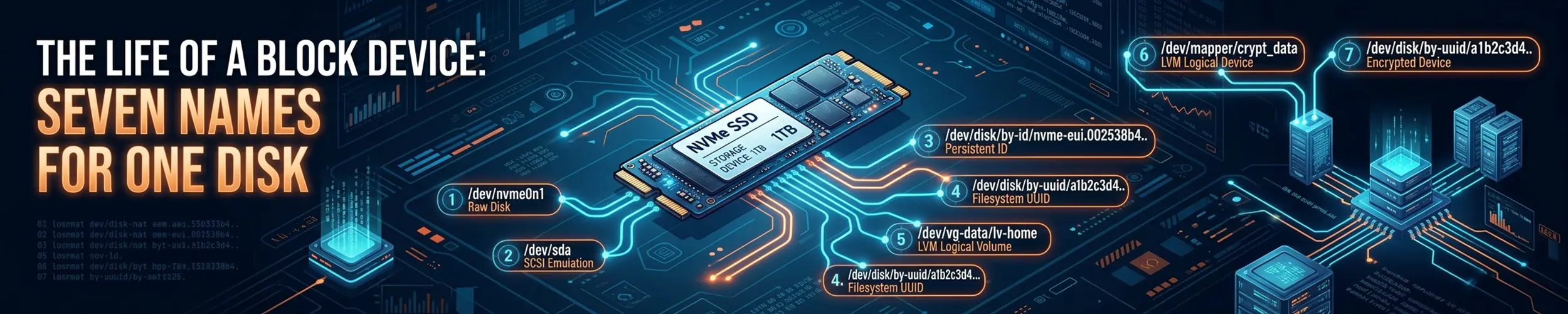
A backup disk is mounted at /srv/archive. The mount is clean, the machine has been up for weeks, findmnt --verify gives it four ticks and a success line, and the newest file in there is from June, because the nightly backups have been landing on a different disk. Two attached disks carry the same filesystem UUID. /dev/disk/by-uuid/ is a directory, a directory holds one entry per name, so one disk gets the name and the other gets nothing: no broken link, no warning, no entry. mount UUID= and the fstab line reach whichever disk won, exit 0, and everything about the result looks correct. That happens because a UUID is a value written inside the filesystem, in the superblock, and so it is copied by anything that copies the filesystem: a VM clone, an image restore, dd, a snapshot attached beside its origin.
Every name a Linux disk has is either a value stored inside the disk, and so copied with it, or a description of the slot it is plugged into, and so changed by moving it. The one name that is neither is reset at every boot and may not be used in fstab. No name your disk has is both stable across a move and unique across a copy. “Always use the UUID” answers the instability half and hands you the collision half.
This page follows one disk through the eight stages between the kernel noticing it and a person asking which physical device they are looking at, measured on Ubuntu 24.04 with systemd/udev 255.4, util-linux 2.39.3 and e2fsprogs 1.47.0. The mechanism finishes at stage five. The question does not.
The eight stages, and what each one can hand you.
- The device appears — the kernel assigns the only two names nothing in userspace can influence.
- The probe — udev reads two entirely different places on the disk and derives four families of name from them.
- Arbitration — one name, one slot, one winner. This is where a duplicate stops being visible.
- The lookup — something turns a name back into a device. There is one arbiter and everything on the machine is downstream of it.
- The mount — and the filesystem check that was aimed at the same symlink.
- The dependents — everything that now believes it knows which disk this is.
- The diagnosis — asking the machine which disk you actually got, and the commands that cannot answer.
- The other copy — the disk that also carries this name, which is somewhere else and is where the fault was created.
The reading. Not “what is this disk called” — every tool answers that. Ask instead: of the names udev gave this disk, do they all still point back at it?
dev=/dev/sdb1          # the device you are asking about

udevadm info -q symlink -n "$dev" | tr ' ' '\n' |
  grep -v '^disk/by-diskseq/' |
  while read -r l; do
    printf '%-58s -> %s\n' "/dev/$l" "$(readlink -f "/dev/$l")"
doneOn a healthy disk every line ends in the device you named. Any line that does not is the finding, and it names the device that took the name.
| What comes back | What it means | Go to |
|---|---|---|
Every line resolves back to $dev | Nothing is contesting this disk’s names. Whatever is wrong is downstream of naming | Stage 5. The mount, the unit, the dependents |
A by-uuid or by-label line resolves to a different device | Two disks carry one identity and this one lost. The winner is named in the output | Stage 3, then stage 8. Something copied a filesystem |
Only by-diskseq — no by-uuid, no by-label, no by-partuuid | Nothing probed a filesystem here. There is no signature to derive a name from | Stage 2. blkid -p and wipefs -n on the raw device |
| It holds a name it did not hold yesterday | The previous holder was detached and the name moved rather than breaking | Stage 8. There is another copy and it has just left the building |
Two limits, stated up front. This needs udevadm, so it does not work in an initramfs, a rescue shell or a chroot — which are three of the places where the answer is different, because that is exactly where the symlinks are absent and a fallback scan chooses instead. And it tells you which device holds a name; it cannot tell you which of two identical filesystems is the one you wanted. That is stage 8, and it is off this machine by construction.
Stage 1 — the device appears
When the kernel registers a disk it assigns two names, and neither can be influenced from userspace.
loop0        7:0
loop0p1      259:0
loop0p2      259:1
diskseq: 24The major:minor pair is the primary key; every other name on this page is an alias that resolves to it. diskseq is a counter that only increases, is never reused within a boot, and resets to 1 when the machine reboots.
udev does not create /dev. devtmpfs creates the node the moment the kernel registers the disk; udev then fixes its ownership and mode and adds symlinks. A node udev has not reached yet is brw------- root root; afterwards it is brw-rw---- root disk. So the node is openable before any name for it exists, which is how a program racing udev at boot finds a disk it cannot name.
Kernel names are recycled and diskseq is not. Attaching and detaching the same image five times:
attach 1: kernel name=/dev/loop0  diskseq=201  fs UUID=1feed34c-...
attach 2: kernel name=/dev/loop0  diskseq=203  fs UUID=1feed34c-...
attach 3: kernel name=/dev/loop0  diskseq=205  fs UUID=1feed34c-...
attach 4: kernel name=/dev/loop0  diskseq=207  fs UUID=1feed34c-...
attach 5: kernel name=/dev/loop0 diskseq=209 fs UUID=1feed34c-...The kernel name repeats. The filesystem UUID repeats. diskseq never does. It is the only guaranteed-unique name the machine has, and the one you cannot use, because it means nothing after a reboot.
Stage 2 — the probe
udev’s work here starts with one rule:
# 60-persistent-storage.rules
KERNEL!="sr*|mmcblk[0-9]boot[0-9]", IMPORT{builtin}="blkid"That builtin reads two different places on the disk. The filesystem superblock gives the ID_FS_* properties; the partition table gives the ID_PART_ENTRY_* ones. udevadm info shows the split:
ID_FS_LABEL=rootfs
ID_FS_TYPE=ext4
ID_FS_UUID=12345678-1111-1111-1111-111111111111         <- inside the filesystem
ID_PART_ENTRY_NAME=rootpart
ID_PART_ENTRY_UUID=aaaaaaaa-0001-0001-0001-000000000001  <- in the partition table
ID_PART_TABLE_UUID=11111111-2222-3333-4444-555555555555 <- in the GPT headerFive rules turn those properties into symlinks, and they are the entire naming system:
ENV{ID_FS_USAGE}=="filesystem|other|crypto", ENV{ID_FS_UUID_ENC}=="?*",
    SYMLINK+="disk/by-uuid/$env{ID_FS_UUID_ENC}"
ENV{ID_FS_USAGE}=="filesystem|other|crypto", ENV{ID_FS_LABEL_ENC}=="?*",
    SYMLINK+="disk/by-label/$env{ID_FS_LABEL_ENC}"
ENV{ID_PART_ENTRY_UUID}=="?*",
    SYMLINK+="disk/by-partuuid/$env{ID_PART_ENTRY_UUID}"
ENV{ID_PART_ENTRY_SCHEME}=="gpt", ENV{ID_PART_ENTRY_NAME}=="?*",
    SYMLINK+="disk/by-partlabel/$env{ID_PART_ENTRY_NAME}"
ENV{DISKSEQ}=="?*", ENV{ID_IGNORE_DISKSEQ}!="1",
SYMLINK+="disk/by-diskseq/$env{DISKSEQ}$env{.PART_SUFFIX}"crypto in the first two is why a LUKS container has a by-uuid entry before it is unlocked, and why crypttab can use UUID=. A sixth family, by-path, comes from the path_id builtin, which is skipped for virtual devices.
For each family: where does the value live, and what changes it?
| Family | The value lives in | Survives a dd clone? | Survives a move to another port? | Allowed in fstab? |
|---|---|---|---|---|
by-uuid | The filesystem superblock | Yes — identically | Yes | Yes |
by-label | The filesystem superblock | Yes — identically | Yes | Yes |
by-partuuid | The GPT partition entry | Yes — identically | Yes | Yes |
by-partlabel | The GPT partition entry | Yes — identically | Yes | Yes |
by-id | The device’s own firmware | No — a clone is a different device | Yes | Yes |
by-path | The sysfs bus topology | No | No | Yes |
by-diskseq | The kernel, per boot | No | No | No — resets at boot |
The four families anybody puts in fstab are content-derived, so a clone duplicates all four at once. The two a clone cannot duplicate describe hardware, and by-path describes a slot:
$ udevadm test-builtin path_id /sys/block/vda
ID_PATH=pci-0000:00:02.0
$ udevadm test-builtin path_id /sys/block/vdb
ID_PATH=pci-0000:00:03.0Nothing in that came off the platter. by-path is unique and not stable, which is the /dev/sdb failure under a more respectable name. by-diskseq is unique and unforgeable and meaningless after a reboot. There is no fourth option.
Change one thing and see which names move:
| You do this | by-uuid | by-label | by-partuuid | Kernel name | diskseq |
|---|---|---|---|---|---|
tune2fs -L newname | unchanged | moves | unchanged | unchanged | unchanged |
tune2fs -U newuuid | moves | unchanged | unchanged | unchanged | unchanged |
mkfs the partition | new value | new value | unchanged | unchanged | unchanged |
| Detach and re-attach | unchanged | unchanged | unchanged | reused | new |
dd the whole disk | duplicated | duplicated | duplicated | n/a | distinct |
| Move it to another port | unchanged | unchanged | unchanged | may change | new |
The mkfs row is the one argument for PARTUUID= that survives this page: reformatting gives the filesystem a new UUID and leaves the partition’s own GUID alone, so PARTUUID= survives a reformat where UUID= does not. It buys nothing against a clone.
Stage 3 — arbitration
Take one ext4 filesystem, write a marker into it, unmount it, copy the whole disk with dd if=/dev/sda of=/dev/sdb, write a different marker into the copy, and attach both, settling udev between each step. This is the best case for the tooling.
ORIGINAL is /dev/loop0
  /dev/disk/by-uuid/ right now:
    aaaaaaaa-bbbb-cccc-dddd-eeeeeeeeeeee -> ../../loop0

CLONE    is /dev/loop1
  /dev/disk/by-uuid/ right now:
aaaaaaaa-bbbb-cccc-dddd-eeeeeeeeeeee -> ../../loop1The name moved the instant the second disk appeared. Then:
$ blkid -U aaaaaaaa-bbbb-cccc-dddd-eeeeeeeeeeee
/dev/loop1
$ mount UUID=aaaaaaaa-bbbb-cccc-dddd-eeeeeeeeeeee /mnt/payroll
$ cat /mnt/payroll/marker
I AM THE CLONE - stale copy from three months agoExit 0 throughout. findmnt on that mount point reports the device, the type, the UUID and the label, every column correct and every column useless.
The winner is deterministic. Each symlink name is a directory under /run/udev/links/ holding one entry per claiming device with its link priority. At equal priority udev takes the most recently processed device. Over ten rounds, five with the clone attached first and five with the original first, the second device processed won every time. The order itself is a race between disks spinning up at speeds nobody controls.
udev knows there are two, and records it:
$ ls -l '/run/udev/links/disk\x2fby-uuid\x2faaaaaaaa-bbbb-cccc-dddd-eeeeeeeeeeee/'
b7:0 -> 0:/dev/loop0
b7:1 -> 0:/dev/loop1Two claimants, both at link priority 0. The information exists on the machine. It is not in /dev, which is the only place anybody is told to look.
Unplugging the winner does not break the name. It moves it. Detach the disk holding the symlink and udev re-points the name at the surviving claimant. The link does not dangle. The next mount succeeds against different data with no error at any point in the transition.
Stage 4 — the lookup
mount UUID= does not search the block devices when udev is running. blkid(8) documents the order as EVALUATE=udev,scan: /dev/disk/by-* first, and a scan of /proc/partitions only if that fails. A stock install has no /etc/blkid.conf, so the compiled-in default applies.
The test is to force the symlink at the disk udev did not choose, then delete it, changing nothing else:
--- STEP 1: point the symlink at the OTHER disk (/dev/loop0) ---
  symlink now  -> /dev/loop0
  blkid -U     -> /dev/loop0
  findfs       -> /dev/loop0
  mount UUID=  -> /dev/loop0, containing DISK-ONE

--- STEP 2: delete the symlink. Nothing else changes. ---
  symlink      -> (absent)
  blkid -U     -> /dev/loop1
  findfs       -> /dev/loop1
mount UUID= -> /dev/loop1, containing DISK-TWOSame tag, same two disks, different data mounted, and the only difference is one symlink. An absent symlink is the normal state of every initramfs before udev has settled, every rescue shell, every chroot and every container. The same fstab line can reach different disks depending on where you are standing when it runs.
systemd-fstab-generator never resolves a UUID itself. Run against a four-line fstab using four spellings, it emits:
mnt-payroll.mount   What=/dev/disk/by-uuid/aaaaaaaa-bbbb-cccc-dddd-eeeeeeeeeeee
mnt-bylabel.mount   What=/dev/disk/by-label/payroll
mnt-bypart.mount    What=/dev/disk/by-partuuid/aaaaaaaa-0001-0001-0001-000000000001
mnt-bydev.mount What=/dev/sdb1All four spellings become a path, three of them under /dev/disk/. systemd waits for udev to publish that path and then trusts it. So there is one arbiter with one slot per name, and mount, blkid -U, findfs and the generated unit are all downstream of it. The question “which disk will this line reach?” therefore has one answer you can look up right now.
Stage 5 — the mount
The generated unit also carries an ordering dependency on the device and a filesystem check:
After=blockdev@dev-disk-by\x2duuid-aaaaaaaa\x2d....target
Requires=systemd-fsck@dev-disk-by\x2duuid-aaaaaaaa\x2d....serviceThe boot-time fsck is aimed at the symlink too. It checks whichever filesystem currently holds that name, before the mount, and it will repair the clone.
Then mount(2) returns 0, the kernel attaches a superblock at a mount point, and /proc/self/mountinfo gains a line. As far as the operating system is concerned, this story is finished. Both disks are mounted, both are healthy, nothing has failed.
Stage 6 — the dependents
Once a filesystem is mounted, a queue of things forms behind it. Each one inherits the naming decision without re-checking it.
- Everything in
fstabunderneath it. A mount orderedAfter=this one — a bind mount, a nested data directory, ax-systemd.requires=chain — attaches to whatever came up, not to what you meant. - Every service with
RequiresMountsFor=on that path. The dependency is satisfied by a mount at that path, not by the right one. A database that starts against a three-month-old copy of its data directory starts cleanly. - Your backup job. It writes into a path, and the path exists, and the write succeeds.
crypttab, which uses the same namespace. A LUKS container gets aby-uuidentry before it is unlocked, and unlocking it creates a second name —/dev/mapper/<name>— in a namespace udev does not arbitrate at all, because that name was chosen by whoever wrotecrypttab.- LVM, which is the one layer here that anticipated this. See below.
What each of those layers does to your bytes belongs to The Life of a Write. What matters here is what each layer is called, and one measured contrast covers the stage.
Attach two disks carrying the same identity and ask each subsystem what it sees. ext4 says nothing: lsblk -f prints two rows with the same UUID, blkid prints two lines, both mount, both exit 0. btrfs says nothing at the identity layer either, though btrfs filesystem show lists one filesystem with Total devices 1 and names only the first disk. LVM says this on every pvs, vgs and lvs you run:
WARNING: Not using device /dev/loop1 for PV eeee00-0000-...-000004.
WARNING: PV eeee00-0000-...-000004 prefers device /dev/loop0 because
         device name matches previous.
  PV         VG        Fmt  Attr PSize  PFree
/dev/loop0 shared_vg lvm2 a-- 60.00m 60.00mIt names the duplicate, the device it rejected, the device it chose, and its tie-breaking rule. “Linux is silent about duplicate identities” is not a law. One layer handles a situation its authors anticipated and another layer does not.
Stage 7 — the diagnosis
Nine fstab entries on one machine, one correct and eight broken in different ways, then every recommended command run once across all nine.
- F1 control, correct in every way · F2 duplicate UUID, two attached disks carry it · F3 the disk is not plugged in · F4 a typo, last character wrong · F5 wrong
fstype, disk is ext4 andfstabsays xfs - F6 duplicate
LABEL, two disks labelledbackup· F7 the mount point directory does not exist · F8 shadowing, the mount point already contains files · F9 the signature was wiped afterfstabwas written
Three different situations produce a byte-identical message.
mount: /mp/f3: can't find UUID=33333333-0000-0000-0000-000000000003.
mount: /mp/f4: can't find UUID=44444444-0000-0000-0000-00000000000X.
mount: /mp/f9: can't find UUID=88888888-0000-0000-0000-000000000008.The disk is not connected, you made a typo and the filesystem was destroyed differ only in the UUID quoted back at you. From mount‘s side they are one condition: the tag did not resolve. findmnt --verify collapses all three the same way, to [E] unreachable on boot required source.
Four of the nine are indistinguishable, and three of those four lose or hide data. findmnt --verify --verbose, the standard pre-reboot check, on four of the entries:
/mp/f1                                    <- CONTROL, correct
   [ ] target exists
   [ ] UUID=11111111-... translated to /dev/loop0
   [ ] source /dev/loop0 exists
   [ ] FS type is ext4
/mp/f2                                    <- DUPLICATE UUID
   [ ] target exists
   [ ] UUID=22222222-... translated to /dev/loop2
   [ ] source /dev/loop2 exists
   [ ] FS type is ext4
/mp/f6                                    <- DUPLICATE LABEL
   [ ] target exists
   [ ] LABEL=backup translated to /dev/loop6
   [ ] source /dev/loop6 exists
   [ ] FS type is ext4
/mp/f8                                    <- SHADOWING
   [ ] target exists
   [ ] UUID=77777777-... translated to /dev/loop7
   [ ] source /dev/loop7 exists
[ ] FS type is ext4Four identical reports, four ticks each. One is healthy. When the machine boots, the other three mount a stale clone, mount the wrong one of two disks labelled backup, and hide a directory of files that was already there. With only the duplicate entry present, the command ends with Success, no errors or warnings detected and exits 0. It cannot do otherwise: it asks libblkid to translate the tag, and libblkid’s answer is a single device path. There is nowhere in that conversation for the word “two” to appear.
The whole grid, scored:
| Command | F1 ok | F2 dup UUID | F3 absent | F4 typo | F5 fstype | F6 dup LABEL | F7 no dir | F8 shadow | F9 wiped |
|---|---|---|---|---|---|---|---|---|---|
lsblk -f | clean | two rows, same UUID, unflagged | absent | clean | clean | two rows, same LABEL | clean | clean | blank row |
blkid | listed | two lines, same UUID | absent | listed | listed | two lines | listed | listed | absent |
ls /dev/disk/by-uuid/ | 1 entry | 1 entry | absent | absent | 1 entry | 1 each | 1 entry | 1 entry | absent |
findmnt --verify | 4 ✓ | 4 ✓ | [E] | [E] | [W] | 4 ✓ | [E] | 4 ✓ | [E] |
findmnt --fstab --evaluate | device | device | blank | blank | device | same device twice | device | device | blank |
mount -a --fake | ok | ok | fails | fails | “mounted” | ok | “mounted” | ok | fails |
mount -a | ok | ok | fails | fails | fails | ok | fails | ok | fails |
systemd-analyze verify | silent | silent | silent | silent | silent | silent | silent | silent | silent |
lsblk -f contains the answer and does not present it. Two rows carry the same thirty-six-character UUID, and finding them means comparing every row against every other by eye. blkid is worse for this: its output is in cache order, so two identical UUIDs can sit four unsorted lines apart.
mount -a --fake is more reassuring than the real thing. It reported successfully mounted for the entry with the wrong fstype and for the entry whose mount point did not exist, both of which the real mount -a refuses. It resolves the tag and stops.
systemd-analyze verify said nothing about any of the nine, including the generated unit containing What=/dev/disk/by-uuid/NOT-A-UUID-AT-ALL, and exited 0.
findmnt --fstab --evaluate is the best tool here. It prints the device each line will actually reach and leaves the source blank for the lines that will not resolve, which separates the three identical error messages. On the duplicate-label entry it printed the same device on two different lines, which is visible. Run it before a reboot:
findmnt --fstab --evaluate      # what each line actually reaches
findmnt --verify --verbose # the checks it can do, which are not theseNothing reports the shadowing case. F8 destroys nothing and hides everything, and not one command in the grid mentions it. findmnt --verify had the mount point in its hand and did not look inside it.
Stage 8 — the other copy
Stages 1 to 7 happen on the machine in front of you. This one does not. A duplicate identity is created by a clone, a restore or a dd performed somewhere else, possibly months earlier, possibly by somebody who has since left. There is one way to stop it recurring: the moment a second copy of a filesystem exists, one of the two needs a new UUID before both are ever attached to the same machine.
The command everybody publishes for that does not work on a current system:
$ sudo tune2fs -U random /dev/sdc1
tune2fs 1.47.0 (5-Feb-2023)
Setting the UUID on this filesystem could take some time.
Proceed anyway (or wait 5 seconds to proceed) ? (y,N) y
This operation requires a freshly checked filesystem.

Please run e2fsck -fD on the filesystem.e2fsprogs 1.47.0 refuses on any filesystem last mounted more recently than it was last checked, which is every filesystem you have ever used. The working sequence is two commands, and the check is not optional:
sudo e2fsck -f /dev/sdc1        # must be unmounted
sudo tune2fs -U random /dev/sdc1
sudo blkid /dev/sdc1 # write the new value into fstabWith metadata_csum the UUID is folded into every metadata checksum on the filesystem, so changing it means rewriting all of them, and the tool will not do that to a filesystem it has not just verified. A filesystem created with -O metadata_csum_seed stores the seed once and changes its UUID instantly. Set that flag at mkfs time on images that will be cloned.
Then update every reference: fstab on the machine that will use the disk, crypttab if a container is involved, and any RequiresMountsFor= or x-systemd.requires= that names the old value. The old value is still inside the other copy, wherever that is. Restoring a Linux Server owns the neighbouring problem, two machines the network cannot tell apart through machine-id and SSH host keys; this page owns two block devices that one machine cannot tell apart. A server restored from an image has probably created both at once.
A worked diagnosis
Back to the backup disk from the top of the page: mounted at /srv/archive, clean, weeks of uptime, newest file from June. Nothing has failed and nothing has alerted.
$ findmnt /srv/archive
TARGET       SOURCE     FSTYPE OPTIONS
/srv/archive /dev/sdc1  ext4   rw,relatime
$ sudo findmnt --verify --verbose | tail -6
/srv/archive
   [ ] target exists
   [ ] UUID=9f2c1a44-... translated to /dev/sdc1
   [ ] source /dev/sdc1 exists
   [ ] FS type is ext4
Success, no errors or warnings detectedFour ticks and a success line. What has been established: the tag resolves to a device, and the device exists. Not that it resolves to the device you meant, and not that it resolves uniquely. This command asks neither question.
$ dev=/dev/sdc1
$ udevadm info -q symlink -n "$dev" | tr ' ' '\n' | grep -v '^disk/by-diskseq/' |
    while read -r l; do printf '%-58s -> %s\n' "/dev/$l" "$(readlink -f "/dev/$l")"; done
/dev/disk/by-uuid/9f2c1a44-3b7e-4c19-8a05-2d6f1e904bb2   -> /dev/sdd1
/dev/disk/by-label/archive                               -> /dev/sdd1
/dev/disk/by-partuuid/7c1e0a92-0001-...                  -> /dev/sdd1
/dev/disk/by-id/wwn-0x5000c500a1b2c3d4-part1             -> /dev/sdc1
/dev/disk/by-path/pci-0000:00:1f.2-ata-3-part1 -> /dev/sdc1Three of this disk’s five names are held by a different device. The two it still owns are the two not derived from its contents: its firmware serial and its bus slot. That pattern is the signature of a clone. /dev/sdd1 holds the names, so /dev/sdd1 is what an fstab line naming that UUID reaches. The mounted disk is the loser, mounted by something that named it directly.
$ ls -l '/run/udev/links/disk\x2fby-uuid\x2f9f2c1a44-3b7e-4c19-8a05-2d6f1e904bb2/'
b8:33 -> 0:/dev/sdc1
b8:49 -> 0:/dev/sdd1
$ sudo mount -o ro /dev/sdd1 /mnt/check && ls -t /mnt/check | head -2
2026-09-05.tar.zst
2026-09-04.tar.zstTwo claimants at equal priority, and the backups have been running perfectly onto /dev/sdd1, the disk that holds the name. Somebody added a second drive in June and seeded it by cloning the first. Since then the timer has written to whichever disk the fstab line reached and a human has been reading the one that was already mounted.
The fix is stage 8, in order. Unmount both. e2fsck -f then tune2fs -U random on the one you are keeping as the second copy. Put the new UUID in fstab. Then, before rebooting, findmnt --fstab --evaluate: the command that would have shown two lines reaching one device, and will now show two lines reaching two.
Deciding the contest yourself
udev built for collisions twice. /run/udev/links/ records every device wanting a name, with its priority, which is how stage 3 could show both disks. And udev(7) documents a knob for deciding the contest rather than leaving it to arrival order:
# /etc/udev/rules.d/10-local-disk-priority.rules
ENV{ID_SERIAL_SHORT}=="WD-1A2B3C4D", OPTIONS+="link_priority=100"Highest priority wins, so the winner becomes a decision rather than a race. It is half a fix: the knob requires you to already suspect there is a contest, and the database that would tell you is in /run rather than /dev, and the man page for the knob does not point at it. Two things stay out of reach on any machine: how many other copies of this identity exist unattached, in a drawer or in object storage, and which of two disks will win after the next reboot.
Before you call it done
findmnt --fstab --evaluaterun before the reboot, and every line reaching a different device- The hinge run against any disk you have cloned, restored or snapshotted — all of its names resolving back to it
- Any second copy given a new UUID with
e2fsck -fthentune2fs -U random, before both are ever attached to one machine nofailandx-systemd.device-timeout=on every non-essential entry, so a missing disk is a warning rather than an emergency shell- The mount point checked to be empty before it is mounted over — nothing else on the machine will tell you
- A
mkfsthat will be cloned given-O metadata_csum_seed, so the copy’s UUID can be changed in a second rather than a full check - Something that watches the content — the age of the newest file — rather than the mount, because a mount succeeding is not evidence about which disk it reached
Related reading
- Disks and Mounting — lsblk, mount and fstab — the reference for the commands, the
fstabfields and the options worth knowing - The Life of a Write — the same stack read as a data path: what LVM, dm-crypt and RAID actually do to your bytes, where this page only says what they are called
- How a Path Becomes a File — symlink resolution itself: the link budget,
O_NOFOLLOW, and why the same string can name two different things - From Power-On to a Login Prompt — the loud version of this failure: a UUID in
fstabthat exists nowhere, and the emergency shell it produces - Restoring a Linux Server — the other copy, in the other namespace: two machines the network cannot tell apart
- The Life of a Network Interface — the other device whose names are computed rather than stored: a versioned udev scheme, re-run by netplan and cloud-init, and what happens when the computation moves
- Filesystems: Inodes, Journalling and Which One to Choose — what is inside the thing being named
- Disk Space — df, du and ncdu — for when the disk that mounted is the right one and is simply full