

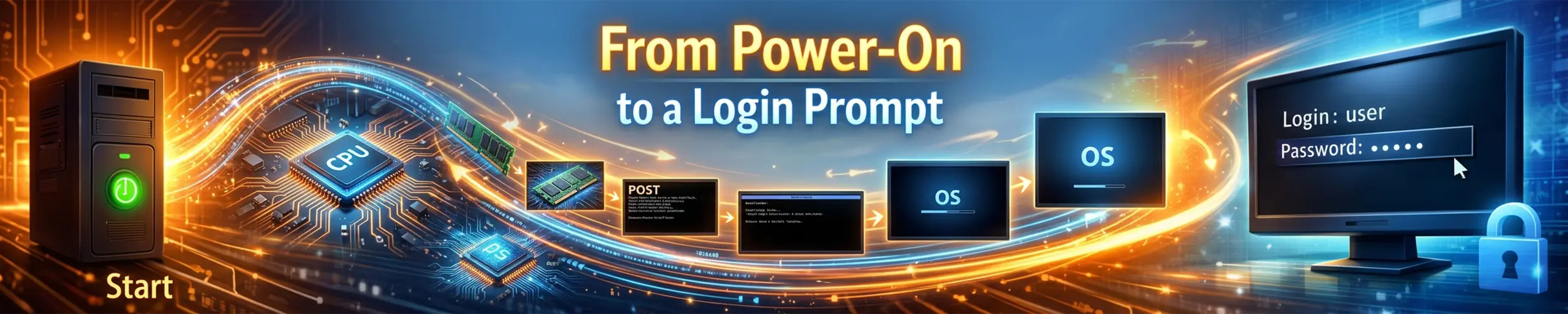
A server is rebooted for a kernel update and does not come back. Twenty minutes later someone opens the remote console and finds it sitting at an emergency shell, asking for the root password, and everyone blames the kernel update — which is nearly always wrong. Booting a Linux machine is a relay race between programs that barely know each other exists: the firmware knows nothing about Linux, the bootloader knows nothing about your filesystem layout, the kernel starts with no drivers for the disk it is about to mount. Each stage does one job, hands control to the next, and then ceases to exist — which is why the thing that broke is usually gone by the time you can look at anything.
This page follows one boot the whole way through, in order, and gives you the command that inspects each handoff. The single most useful skill it teaches is not any individual command: it is learning to work out how far the boot got, because that immediately eliminates most of the chain. How Linux Boots covers the same sequence at the level you need to fix a normal problem; this is the level below it, and quite a lot of it changed in 2025 and 2026.
The handoffs, once, so the rest of the page makes sense. Eight of them, and each one is a point where a boot can stop:
- Firmware picks a boot entry and runs a file off the EFI System Partition.
- shim verifies the next stage against Secure Boot, and gets out of the way.
- The bootloader finds a kernel and an initramfs, and builds a command line.
- The kernel unpacks itself, brings up the CPU and memory, and unpacks the initramfs into a filesystem in RAM.
- Early userspace —
/initin that RAM filesystem — loads the drivers needed to reach the real root, and mounts it. - The switch to the real root, after which the entire initramfs is deleted.
- systemd starts as PID 1 and pulls in everything that
default.targetdepends on. - getty or a display manager opens a terminal and asks who you are.
The single most useful diagnostic fact on this page: if journalctl -b -1 shows you anything at all from the failed boot, stages one to six succeeded. The journal only exists once the real root is mounted and systemd is running. An empty previous boot points at the first half of the chain; a full one that ends badly points at the second.
1. Firmware, and the fact that it does not know what Linux is
On a UEFI machine — which is every machine you are likely to be installing on now — the firmware does not scan disks for something bootable. It reads a list of boot entries out of its own non-volatile memory; each entry names a disk, a partition, and a path to a file. That is the whole mechanism, and the variables are visible from a running Linux system because the kernel exposes them as files:
efibootmgr -v

BootCurrent: 0001
Timeout: 1 seconds
BootOrder: 0001,0002,0000
Boot0000* Windows Boot Manager	HD(1,GPT,...)/File(\EFI\Microsoft\Boot\bootmgfw.efi)
Boot0001* Fedora	HD(1,GPT,...)/File(\EFI\fedora\shimx64.efi)
Boot0002* UEFI: Built-in EFI ShellBootOrder is the list the firmware works down. BootCurrent is the one that actually ran this time. BootNext, if set, overrides the order exactly once and then clears itself — the safe way to test a new boot path on a machine you cannot easily get to physically. The file it points at lives on the EFI System Partition: a FAT32 partition with a specific GPT type GUID, mounted at /boot/efi on Fedora and Debian-family systems or at /efi where the newer systemd conventions are followed. It has been getting larger — Fedora raised its minimum to 500 MB in Fedora 39, matching Windows — because kernels and initramfs images are increasingly stored there rather than on a separate /boot. One check settles which world you are in, and almost every piece of boot advice on the internet applies to only one of them:
[ -d /sys/firmware/efi ] && echo "UEFI" || echo "BIOS/CSM"If that directory does not exist, the machine booted in legacy BIOS mode, there are no EFI variables, efibootmgr will not work, and the next section does not apply to you. Legacy BIOS is not quite dead: Intel said it would stop shipping CSM support around 2020, but Fedora’s proposal to deprecate legacy BIOS was withdrawn, RHEL 10 has not removed it, and openSUSE Leap 16 still supports it — while noting that some features, full-disk encryption bound to a TPM among them, are simply unavailable there.
2. shim, and what Secure Boot is actually checking
Notice that the Fedora entry above points at shimx64.efi, not at GRUB. That indirection exists for one reason: the firmware trusts a small set of certificates burned in by the manufacturer, and in practice that means Microsoft’s. No Linux distribution is going to get its own key into every motherboard in the world.
shim is the workaround, and it is deliberately tiny. Microsoft signs it; it carries the distribution’s own certificate inside itself and uses that to verify whatever it loads next. So the firmware trusts Microsoft, Microsoft trusts shim, and shim trusts Fedora — a chain of three, of which only the middle link needed anyone else’s cooperation. Two things hang off shim. MOK, the Machine Owner Key list, lets you enrol your own certificate through MokManager — the blue screen you get on the reboot after installing an out-of-tree graphics or VPN driver. SBAT is the revocation mechanism: generation numbers per component rather than blacklisted binary hashes, so a whole class of known-vulnerable bootloaders can be refused at once.
Secure Boot has a second, quieter consequence. On EFI x86 and arm64 systems the kernel’s lockdown LSM is enabled automatically when the machine booted in Secure Boot mode, blocking the things that would let root rewrite the running kernel — unsigned modules, /dev/mem, some kexec paths, certain debugging interfaces. Ubuntu has done this since 20.04, and the Red Hat family does it too. It is a common cause of “this worked on my other machine”: the module is fine, the kernel simply will not load it.
# the whole picture in one command
bootctl status

# and the kernel's own view of lockdown
cat /sys/kernel/security/lockdown
none [integrity] confidentialityThe certificates at the root of all this expire in 2026. Microsoft’s 2011 UEFI CA and KEK reached the end of their lives in June 2026, replaced by a 2023 generation, and it is the biggest boot-path story of the year because nothing breaks on the day. Machines whose firmware certificate stores are never updated keep booting exactly as they do today — but they stop being able to accept new signed boot components, because shim updates issued from late 2026 onward are signed with the 2023 CA. The failure mode is a security update you cannot install, on a machine that appears to be working perfectly. The distribution answer is firmware updates through fwupd, which on Ubuntu is rolling the 2023 CA out from version 2.0.0 onward; if you administer machines with Secure Boot enabled, fwupdmgr get-updates belongs in your patching routine this year in a way it did not before.
3. The bootloader, and the config file that does nothing
Despite a decade of predictions, GRUB is still the default essentially everywhere: Fedora, RHEL 10, Debian 13, Ubuntu 26.04, openSUSE Leap 16. Arch ships no bootloader at all — its base package deliberately contains neither a bootloader nor an initramfs generator, which is why an Arch install involves choosing both. Among distributions you are likely to meet, Pop!_OS is the notable one that defaults to systemd-boot instead, managed by its own kernelstub tool.
Fedora’s position is worth recording because it went the other way from what many expected. In July 2026 FESCo accepted a grub2-light change for Fedora 45 — a stripped-down, UEFI-only GRUB that boots Unified Kernel Images — in preference to adopting systemd-boot, on the argument that GRUB has had far more scrutiny and fuzzing. GRUB is not going anywhere in the Red Hat family. What the bootloader has to produce is three things: a kernel, an initramfs, and a command line. Where it gets them from is the part that has quietly changed.
On Fedora and RHEL, editing /etc/default/grub does nothing. If you take one practical thing from this section, take that one — because the failure is silent. You follow instructions that were correct for years, get no error, reboot, and the setting has not taken effect.
Since Fedora 30, those distributions use the Boot Loader Specification. Each kernel gets a small file in /boot/loader/entries/ holding its own title, kernel path, initrd path and command line, and GRUB reads them through its blscfg module. grub2-mkconfig no longer generates the menu from /etc/default/grub; the BLS files are the source of truth.
The correct way to change a kernel parameter there is grubby, which edits those files directly:
grubby --update-kernel=ALL --args="transparent_hugepage=never"
grubby --update-kernel=ALL --remove-args="quiet rhgb"
grubby --info=ALL | head

# if you must edit /etc/default/grub, push it into the BLS snippets:
grub2-mkconfig -o /boot/grub2/grub.cfg --update-bls-cmdlineOne related trap on the same systems: /boot/efi/EFI/fedora/grub.cfg is a stub that forwards to /boot/grub2/grub.cfg. Editing the one on the ESP, which is the one most guides tell you to write to, achieves nothing either.
BLS is no longer a systemd-specific idea, incidentally — it is a UAPI Group specification, which is why Fedora can use it under GRUB while systemd-boot uses it natively. It defines two kinds of entry: Type #1, the .conf text files described above, and Type #2, a Unified Kernel Image dropped into /EFI/Linux/ with no configuration file at all.
4. Unified Kernel Images, and why they are appearing everywhere
A UKI is the kernel, the initramfs, the command line, the microcode and a copy of os-release packed into a single UEFI executable, with a small stub (systemd-stub) at the front that knows how to take itself apart and start the kernel inside. Each piece is a named PE section: .linux, .initrd, .cmdline, .osrel, .uname. The reason this matters is that a UKI can be signed as one object. In the traditional arrangement Secure Boot verifies the bootloader and the bootloader verifies the kernel, but the initramfs and the command line are unsigned — and both are excellent places to subvert a machine. Fold them into the signed binary and that gap closes.
That in turn is what makes TPM-bound disk encryption practical: because the whole boot chain is measured and the expected measurements can be calculated in advance, a disk can be unlocked automatically by the TPM only when the machine booted exactly the software it is supposed to. ukify builds these (systemd 253) and systemd-measure generates the signed policy that lets an update survive without re-enrolling anything.
# what is actually in a UKI
objdump -h /boot/efi/EFI/Linux/*.efi | grep -E '\.(linux|initrd|cmdline|osrel|uname)'

# what the running system booted from
bootctl listWhere this stands in practice, as of late 2026: nobody boots UKIs by default across the board, but they are no longer exotic. Fedora’s support is opt-in and can boot a UKI directly from shim with no bootloader in between. Ubuntu 26.04 uses a UKI in one specific and increasingly common case — its TPM-backed full-disk encryption install path, experimental from 23.10 and generally available in 26.04. Enable that option and your kernel and initramfs live on the ESP inside a single signed file, and a lot of traditional advice about regenerating initramfs images stops applying cleanly.
5. The kernel, and the filesystem that arrives in a cpio archive
The kernel decompresses itself, sets up memory management, brings up the other CPUs, and initialises the drivers built into it. Then it faces the problem that defines the next two stages: it has no driver for your root filesystem — a distribution kernel containing every storage, RAID, encryption and filesystem driver would be enormous, so almost all of them are modules, and the modules live on the disk that cannot yet be read. The initramfs breaks the circle. It is a compressed cpio archive, loaded into memory by the bootloader, which the kernel unpacks into a small filesystem in RAM; if that filesystem contains a file called /init, the kernel executes it as PID 1 and userspace has begun.
The terminology is a genuine muddle, and worth getting straight once. An initrd, historically, was a filesystem image presented as a block device; you mounted it, and control eventually returned to the kernel. An initramfs is an archive unpacked into a RAM filesystem, and its /init never returns — it is the first process. Every mainstream distribution has used initramfs for many years; the word “initrd” survives only as the filename and the bootloader directive, and Linux 7.0 finally removed the last of the old linuxrc-based initrd code.
# look inside the one you are running with
lsinitrd /boot/initramfs-$(uname -r).img | head -40      # dracut
lsinitramfs /boot/initrd.img-$(uname -r) | head -40      # initramfs-tools

# and the completely generic way, which always works
mkdir /tmp/ir && cd /tmp/ir
zstd -dc /boot/initramfs-$(uname -r).img | cpio -idmv 2>/dev/null6. Early userspace, and the great dracut migration
What runs inside the initramfs has one job: assemble whatever is needed to reach the real root, mount it, and get out of the way — an NVMe driver and a LUKS volume on a laptop, a RAID array, LVM or an iSCSI target on a server. Which tool built it has become a live question again, after years of stability. There are three generators in common use, and one of them just moved:
| Generator | Used by | Rebuild with |
|---|---|---|
| dracut | Fedora, RHEL, openSUSE, and now Ubuntu | dracut -f, or dracut --regenerate-all -f |
| initramfs-tools | Debian; Ubuntu until recently, still installable | update-initramfs -u -k all |
| mkinitcpio | Arch | mkinitcpio -P |
Ubuntu made dracut the default on Desktop in 25.10 and across the board in 26.04 LTS, replacing initramfs-tools — the largest change to early userspace on a Debian-family system in a very long time, and it lands in a long-term-support release. Debian itself is still on initramfs-tools; a wishlist bug proposing the same switch was filed in 2025 and I have not been able to confirm any decision, so do not assume the two behave alike any more. The practical consequence for anyone with notes: the command you type to rebuild an initramfs on Ubuntu changed, and so did the way you break into one to debug it. rd.break is dracut-specific — it was never an initramfs-tools option, and now it is the one that works on Ubuntu.
# dracut: stop at a named point and give you a shell
rd.break=pre-mount        # also: cmdline, pre-udev, pre-trigger, initqueue, mount, pre-pivot, cleanup
rd.debug rd.shell         # trace everything, and drop to a shell if root will not mount

# initramfs-tools
break=premount            # also: top, modules, mount, bottom, init
debug=vc                  # log to the console rather than a file you cannot read

# mkinitcpio
break=premount            # or break=postmount
rd.debugAdd one of those to the kernel line by pressing e at the GRUB menu. The shell you land in is inside the initramfs, before the real root exists — so the tools available are only the ones baked into the image, and anything you were hoping to read off the disk is not there yet. That constraint is the entire point: it is where you find out why the disk is not there yet.
7. The switch to the real root, which is stranger than it sounds
Once the real root is mounted — at /sysroot, by convention — the initramfs has to hand over, and it cannot simply chroot, because it is already PID 1 and the root filesystem it is standing on is the one that needs to disappear. The traditional mechanism is switch_root, whose man page contains a sentence that surprises people: it recursively deletes every file on the current root filesystem. That is not vandalism. The initramfs lives in RAM, and deleting its contents is how that RAM is handed back; the old root is not set aside, it is destroyed.
Where systemd is in the initramfs — which is now the common case — the sequence has names you will see in logs, and they are worth recognising because a hang here produces messages that look like nothing else: initrd.target is the default target inside the initramfs, sysroot.mount mounts the real root, initrd-parse-etc.service reads /sysroot/etc/fstab looking for a separate /usr, and finally initrd-switch-root.target does the handover. The same PID 1 then re-executes itself from the real root’s systemd.
This stage changed in Linux 7.0, in a way that has not yet reached distributions but will. The kernel now creates a minimal nullfs as the true root with the initramfs layered above it, which means pivot_root() — the clean, ordinary mechanism, previously unusable from an initramfs — simply works:
chdir(new_root);
pivot_root(".", ".");
umount2(".", MNT_DETACH);The old dance required quiescing the system and re-executing PID 1; one report measured around two seconds of boot time saved by dropping it. systemd still ships initrd-switch-root.target and no distribution has switched over, so this is something to expect rather than something to look for. A close relative uses the same machinery deliberately: systemctl soft-reboot, added in systemd 254, shuts down all of userspace and switches into a new root filesystem at /run/nextroot/ without rebooting the kernel, the firmware or the bootloader. On a machine where POST takes forty seconds, applying a userspace update this way is the difference between a maintenance window and a hiccup.
8. systemd, and the difference between needing and waiting
PID 1 on the real root reads default.target — normally an alias for graphical.target or multi-user.target — and activates everything it depends on, down through multi-user.target, basic.target and sysinit.target, where the low-level work happens. systemd Beyond Services covers units in general; the part that matters for booting is one distinction. Wants= and Requires= say what must be started. Before= and After= say in what order. They are entirely independent, and a unit can require another and still race it. This single misunderstanding produces most “works when I start it by hand, fails at boot” reports: the dependency is declared, so the other thing does start, but nothing said to wait for it.
# what took the time
systemd-analyze time
systemd-analyze blame | head -20

# what was actually on the critical path, which is the more useful question
systemd-analyze critical-chain
systemd-analyze critical-chain nginx.service

# a picture, if you are presenting the problem to someone else
systemd-analyze plot > boot.svgblame is the one everybody reaches for and the one most likely to mislead: it cannot report meaningfully on Type=simple services, because systemd considers those started the instant they are forked. A service that takes ninety seconds to become useful will show up as taking a millisecond. critical-chain is the honest answer to “why is this boot slow”, because it shows only what actually delayed the next thing.
For a boot that is not slow but stuck, a different command: systemctl list-jobs shows what is still waiting, and the entry marked running at the bottom of a long list of waiting entries is the thing everything else is blocked on. Two recent changes matter if you maintain older systems: systemd 260, in March 2026, removed SysV init script compatibility entirely — an /etc/init.d script that has quietly worked for fifteen years will simply not run — and version 255 dropped support for unmerged /usr. The current release as of mid-2026 is 262.
9. getty, and the prompt itself
The last handoff is the smallest. getty@tty1.service — or a display manager on a desktop — opens a terminal device, prints the contents of /etc/issue, and waits. When you type a username it executes login, which authenticates you through PAM, sets up your session, and finally execs your shell.
The reason to know this is that a machine which reaches a login prompt and refuses your correct password has failed somewhere entirely different from one that never reaches the prompt. The first is a PAM, home-directory or account problem; the second is a boot problem; they share no diagnosis. One change coming in Fedora 45 will make early boot look different without changing what it does: the kernel console fbcon is being replaced by the userspace kmscon, so if you read a machine’s health from the exact appearance of its early text output, that appearance is about to change.
10. A worked diagnosis
Back to the server from the top of the page: rebooted for a kernel update, twenty minutes of silence, an emergency shell asking for the root password. Do not start with the kernel. Start by asking how far it got — log in at the emergency shell and look at the boot that failed:
journalctl -b -1 --no-pager | tail -50
journalctl -b -1 -p errThere is a previous boot, and it is full of ordinary kernel messages. That single fact eliminates stages one through six: the firmware found the entry, shim passed it on, GRUB loaded the new kernel, the kernel unpacked the initramfs, early userspace found the root filesystem, and the switch happened — because none of the journal would exist otherwise. The new kernel is fine. Whatever went wrong is in systemd’s territory.
What is systemd unhappy about?
systemctl --failed
systemctl list-jobs

  UNIT                    LOAD   ACTIVE SUB    DESCRIPTION
● srv-backups.mount       loaded failed failed /srv/backups
● local-fs.target loaded failed failed Local File SystemsA mount unit failed, which failed local-fs.target, which is a dependency of basic.target, which everything else waits behind. systemd waited its default ninety seconds for the device, gave up, and dropped to emergency.target — which, unlike rescue.target, deliberately pulls in nothing at all, because it cannot assume any filesystem is trustworthy. That is why the machine looks so much more broken than it is.
Which device, and where did it go?
systemctl status srv-backups.mount
grep backups /etc/fstab
blkid | grep -i backup
lsblk -o NAME,SIZE,FSTYPE,UUID,MOUNTPOINTThe UUID in fstab does not appear in blkid output. The volume is present and healthy — but somebody rebuilt that array three weeks ago, which gave the new filesystem a new UUID, and nobody rebooted in between. The change that broke this boot happened three weeks before the boot that revealed it. That gap is why “what did you just change?” is such an unreliable question about boot failures.
The immediate fix is the current UUID in fstab. The durable fix is nofail on every mount that is not required for the system to function:
UUID=...  /srv/backups  ext4  defaults,nofail,x-systemd.device-timeout=10s  0 2

# and always, before you walk away from an fstab edit:
systemctl daemon-reload
mount -aWith nofail, a missing backup volume becomes a warning in the journal instead of a server that will not boot. It is one word, and it is the difference between an inconvenience and a callout.
Notice what the method bought. Had journalctl -b -1 been empty, the entire second half of the chain would have been eliminated instead, and the next questions would have been efibootmgr -v and bootctl status from a live image — does the firmware entry still exist, does the file it points at still exist, is the ESP even mounted. By the time systemd has a complete picture every stage that could have failed has already deleted itself, so the discipline starts with a question rather than a command: how far did it get? A journal from the failed boot means the first six stages worked and you are looking at units; no journal means the opposite. And carry away the delay: bootloader configuration, fstab and initramfs contents are read once, at boot, so a mistake in any of them is invisible until the next reboot — which on a server may be a quarter of a year later. Rebooting deliberately, while you remember what you changed, is not caution; it is the only way to find out whether the change worked.
11. Symptom, stage, command
| What you see | Stage and likely cause | What to run |
|---|---|---|
| “No bootable device” from the firmware | 1 — the boot entry or the ESP is gone | efibootmgr -v from a live image; check the ESP is present |
| Boots to the firmware setup screen every time | 1 — BootOrder lost or the entry is last | efibootmgr -o 0001,0000 |
| Worked, then stopped after a firmware update | 1 — firmware update cleared the EFI variables | Re-run the distro’s bootloader install; efibootmgr -c |
| “Verification failed” or “Access denied” before the menu | 2 — Secure Boot rejected the next stage | bootctl status; check for a pending MOK enrolment |
| A third-party module will not load, no error in the module | 2 — kernel lockdown under Secure Boot | cat /sys/kernel/security/lockdown |
| A signed update refuses to install on an older machine | 2 — the 2011 Microsoft CA has expired | fwupdmgr get-updates; update firmware certificates |
| A kernel parameter has no effect on Fedora or RHEL | 3 — /etc/default/grub is not the source of truth | grubby --info=ALL; set it with grubby --args= |
| The GRUB menu lists a kernel that no longer exists | 3 — a stale BLS entry | ls /boot/loader/entries/; remove the orphan |
| Menu appears, then a black screen and nothing | 3 or 4 — kernel loaded, no console output | Remove quiet and rhgb/splash from the kernel line |
| Kernel panic: “unable to mount root fs” | 5 — the initramfs lacks the driver for the root device | Boot the old kernel; lsinitrd the new image; rebuild it |
Dropped to a dracut:/# prompt | 5 — the root device never appeared | lsblk, cat /proc/cmdline, dmesg | tail in that shell |
| Hangs after “Reached target Initrd Root Device” | 5 — waiting on a device, LUKS or RAID that never came up | Reboot with rd.break=pre-mount rd.debug |
| Root filesystem is mounted read-only at boot | 5 or 6 — fsck failed, or the switch never completed cleanly | journalctl -b -1 -p err; fsck from a live image |
| Boot stalls for exactly ninety seconds, then continues | 7 — a unit hit the default timeout | systemd-analyze blame; add nofail if it is a mount |
| Emergency shell asking for the root password | 7 — local-fs.target failed, usually an fstab entry | systemctl --failed; journalctl -b -1 -p err |
| Boot hangs with no message at all | 7 — one job blocking everything behind it | systemctl list-jobs — find the one marked running |
| A service works by hand and fails at boot | 7 — Wants= without After= | systemctl show unit -p After -p Wants |
An /etc/init.d script stopped running after an upgrade | 7 — systemd 260 removed SysV compatibility | Write a unit file; systemctl status will show it is unknown |
Boot is slow and blame shows nothing large | 7 — Type=simple services are not measured usefully | systemd-analyze critical-chain |
| Login prompt appears but the password is refused | 8 — not a boot problem at all: PAM, account or home | journalctl -u systemd-logind; passwd -S user |
| Machine boots but the previous boot left no journal | — the journal is volatile | mkdir -p /var/log/journal and systemd-journald will persist it |
That last row is worth acting on before you need it. If journalctl -b -1 says there are no previous boots, the journal is being kept in RAM only, and every failed boot is erasing its own evidence. One directory fixes it permanently, and it is the single best preparation for the next problem on this list.
Related reading
- How Linux Boots — the same sequence at the level you need to fix a normal problem
- systemd Beyond Services — units, targets and the ordering rules stage 8 depends on
- Disk encryption on a Linux laptop — the encryption side of stage 5: LUKS, and what it does and does not protect
- Permissions and Privilege, Properly — the same walk, for the six layers between a process and a file
- The Life of a Packet — the same walk, for everything between an application and the wire
- The Life of a Network Interface — the same walk, for the interface: the rename that happens inside the initramfs from a
.linkcopy taken when the image was built, and the wait-online that decides when the boot is “online”