

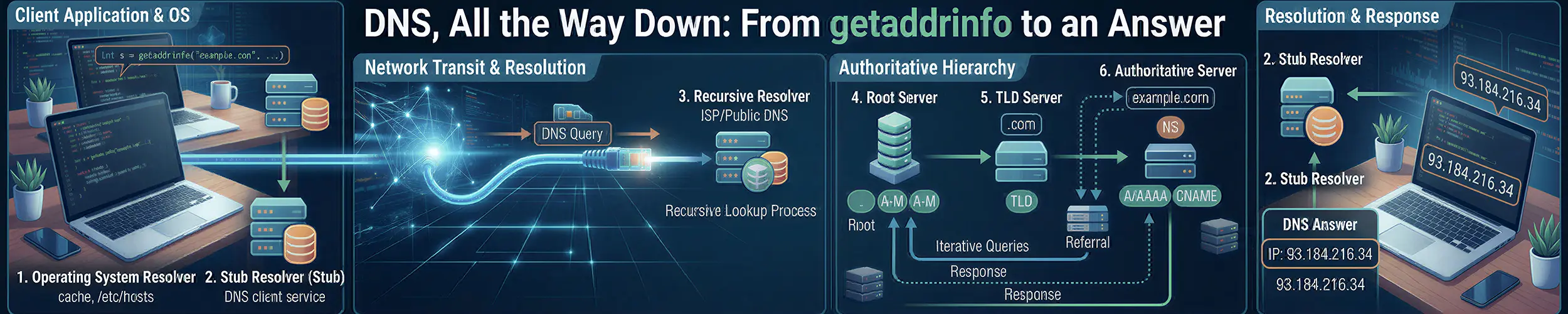
An application on a VPN-connected laptop cannot reach db.internal.corp.example. The operator runs dig @1.1.1.1 db.internal.corp.example, gets NXDOMAIN, and concludes that DNS is broken. The VPN’s resolver has the record and will hand it over to anyone who asks it directly; the laptop is throwing the answer away, for a reason dig cannot see, at a stage dig never passes through. Between a name and an address sit eight stages, and the first three happen entirely inside your own machine, before a DNS query exists at all. A large share of what gets reported as “DNS is broken” is not a DNS problem, and the tool everyone reaches for first is structurally incapable of seeing where those problems live. dig does not read /etc/hosts, does not load a name service module, does not sort its results, and never asked the question your application asked.
This page walks the full path in order, from the library call an application makes to the answer coming back and being cached in several places at once. If you want the concepts first, start with the introduction to DNS resolution; this one is the machinery. What happens to the UDP datagram once the stub hands it to the kernel is The Life of a Packet‘s, and the clocks that govern how long an answer lives at the authoritative end are The Life of a DNS Zone‘s.
The eight stages, and the question that splits them
- The library call. The application calls
getaddrinfo. No DNS yet. - NSS decides who answers.
/etc/nsswitch.confpicks which sources are consulted, and in what order. - A stub resolver takes the question. Either glibc’s own, reading
/etc/resolv.conf, or systemd-resolved. - The query goes out. A UDP packet on port 53, or a TCP connection, carrying one question and a set of assumptions about size.
- A recursive resolver does the work. Root, then top-level domain, then authoritative — or, far more often, its own cache.
- An authoritative server answers, or tells you the name does not exist, or fails.
- Validation. If anything in the chain is checking signatures, this is where the answer is accepted or rejected.
- Caching, all the way back. Four or five independent layers store the result under different rules.
dig speaks the DNS protocol. It reads /etc/resolv.conf only to find a server address, then talks to that server directly. getent ahosts speaks getaddrinfo — the identical code path an application uses, including /etc/hosts, the module ordering, the dual-stack merge and the address sorting.
So there is a clean split. If dig returns the right answer and getent ahosts does not, the fault is in stages 1 to 3, it is on your own machine, and it is not a DNS problem. If both fail in the same way, it is stages 4 to 8, and it is.
Stage 1 — The library call
Applications do not do DNS. They call a C library function and get back a list of socket addresses. On Linux that function is getaddrinfo(3), and two things about it deserve attention. The first is a list: it returns several addresses, in a deliberate order, and the application almost always tries the first one. The second is that the order is not the order DNS gave. Before returning, glibc sorts the addresses according to RFC 6724, which weighs scope, precedence and label to decide whether IPv6 or IPv4 should be tried first.
That is a failure that looks exactly like DNS and is not. On a dual-stack host with broken or black-holed IPv6 egress, the AAAA record sorts first because IPv6 has higher precedence in the default table. The application connects to it and gets a multi-second stall on every connection before falling back. Meanwhile dig looks perfectly healthy, because dig does not sort and does not connect. The fix is not a DNS change at all:
# /etc/gai.conf
# Promote IPv4-mapped addresses above native IPv6
precedence ::ffff:0:0/96 100One more thing from that file’s neighbourhood: glibc only applies AI_ADDRCONFIG, which suppresses AAAA lookups on a machine with no IPv6 address, when the caller passes hints as NULL. Most real programs pass a non-NULL hints with ai_flags zero, so the AAAA query goes out regardless, which is why two programs on the same host can produce different query patterns for the same name.
Stage 2 — NSS decides who answers
getaddrinfo does not know what DNS is. It asks the Name Service Switch, and the hosts: line in /etc/nsswitch.conf decides which sources get consulted and in what order. This is where the answer to “why does /etc/hosts work, and when does it not” actually lives.
| Module | What it answers from |
|---|---|
files | /etc/hosts |
dns | glibc’s own stub resolver, reading /etc/resolv.conf and speaking DNS on the wire |
resolve | nss-resolve — talks to systemd-resolved over Varlink, not over 127.0.0.53 |
myhostname | Synthesised: the local hostname, localhost, _gateway, _outbound |
mymachines | Names of local systemd-nspawn containers and machines |
mdns4_minimal | nss-mdns via Avahi — .local only, IPv4 only in the 4 variant |
hosts: line. nss-systemd is not one of them — it serves passwd and group, not hosts, and any example that lists it there is wrong.The systemd project’s own recommended line, from the nss-resolve(8) manual page, is this:
hosts: mymachines resolve [!UNAVAIL=return] files myhostname dnsReading the action syntax correctly
A bracketed term is [STATUS=ACTION], and a leading ! negates the status test. There are four statuses a module can report — success, notfound, unavail and tryagain — and by default only success stops the search.
So [!UNAVAIL=return] means: for every status except UNAVAIL, return. If resolve answers at all, whether with an address or a definitive “no such name”, the search stops there; only if resolved is not running does the lookup fall through. Compare Avahi’s mdns4_minimal [NOTFOUND=return] dns: that one overrides the default continue for a negative answer, so a “not found” from mDNS stops the search dead. The two forms look almost identical and do opposite things.
Why files comes after resolve
On a resolved system, /etc/hosts is normally not read by the files module at all: systemd-resolved reads it itself (ReadEtcHosts= defaults to yes) and answers before files is ever reached, so the files entry is a fallback for when resolved is down. “Does /etc/hosts work?” is then a question about resolved, not about NSS ordering, and since systemd 261 a SIGHUP makes resolved re-read it.
What varies by distribution
Do not trust a table of per-distribution hosts: lines, including one you find here. This is genuinely inconsistent, changes between releases, and is trivially checkable on the machine in front of you:
grep '^hosts:' /etc/nsswitch.conf
readlink -f /etc/resolv.conf
systemctl is-enabled systemd-resolved 2>/dev/null || echo "not installed/enabled"There is a second axis, and it is the one people miss: a machine can be using systemd-resolved without having resolve on the hosts: line at all. If /etc/resolv.conf points at 127.0.0.53, then plain nss-dns reaches resolved by sending it a DNS packet. Same daemon, completely different code path in, different behaviour on the edges. Checking one of those two files tells you almost nothing without the other.
And on Alpine, or anything else built on musl, none of this section applies. musl has no NSS at all: no /etc/nsswitch.conf, no modules, no resolve, no myhostname. It reads /etc/hosts, then /etc/resolv.conf, and that is the entire mechanism. Any advice involving module ordering silently does nothing there.
Stage 3 — The stub resolver, and systemd-resolved
A stub resolver turns “what is the address of this name” into a DNS query aimed at somebody else’s recursive resolver. glibc has one built in, configured by /etc/resolv.conf; systemd-resolved is a different one, running as a daemon, with its own cache and its own routing rules.
/etc/resolv.conf, and the options that matter
| Option | Default | Notes |
|---|---|---|
ndots | 1 | Capped at 15. Governs when the search list is tried before the name is tried as-is |
timeout | 5 seconds | Per nameserver, per attempt |
attempts | 2 | Rounds through the whole nameserver list |
no-aaaa | off | glibc 2.36 and later. Suppresses AAAA queries in the stub entirely |
single-request | off | glibc 2.10. Serialises A and AAAA, which are otherwise sent in parallel |
trust-ad | off | glibc 2.31. Controls whether the AD bit is passed through |
use-vc | off | Force TCP for everything |
A correction that is overdue by nearly a decade: you will still be told that long-running processes cache /etc/resolv.conf forever and must be restarted after you edit it. glibc has automatically detected and applied changes to /etc/resolv.conf since version 2.26, released in 2017.
The search-domain limit has the same shape. glibc capped the search list at six domains and 256 characters up to 2.25 and removed the limit in 2.26. musl still ignores a search line longer than 256 characters — not truncates it, ignores it entirely. So the folklore is now true of the wrong C library, in the one environment where search lists get very long.
The three modes of /etc/resolv.conf
- Stub mode — symlink to
/run/systemd/resolve/stub-resolv.conf. Lists 127.0.0.53 as the only nameserver, plus the current search domains. This is the recommended mode and what Fedora and Ubuntu ship. - Static stub mode — symlink to
/usr/lib/systemd/resolv.conf. Also 127.0.0.53, but a fixed file with no search domains that never changes. Useful in images. - Uplink mode — symlink to
/run/systemd/resolve/resolv.conf. Lists every upstream server resolved knows about. This bypasses resolved at the packet level: glibc talks straight to the upstream servers and you lose the cache, DNSSEC, DNS over TLS and split DNS.
People switch to uplink mode to “fix” something, it appears to work, and then split-horizon VPN names stop resolving a week later. readlink -f /etc/resolv.conf is the first thing to check on any machine where DNS behaves inexplicably.
What resolved actually defaults to
| Setting | Default |
|---|---|
DNSSEC= | no |
DNSOverTLS= | no |
Cache= | yes |
CacheFromLocalhost= | no — answers from 127.0.0.1 are not cached |
ReadEtcHosts= | yes |
StaleRetentionSec= | 0 — no serve-stale |
DNSStubListener= | yes, on UDP and TCP |
That first row is where writing about systemd-resolved goes wrong more often than anywhere else. DNSSEC= defaults to no, not to allow-downgrade: the manual page recommends allow-downgrade in the same paragraph that states the default, and a skim-reader converts the one into the other. Verify it with resolvectl status rather than believing anybody, including this page.
Per-link DNS, and the VPN surprise
resolved does not have “a nameserver”. It has a set of servers per network link, plus rules about which names route to which link. A domain written with a leading tilde — ~corp.example — is a routing-only domain: send queries for this suffix to this link’s servers, but do not add it to the search list. A bare corp.example does both. And ~. means “route everything here”, which is how one interface becomes the default DNS route.
The consequence is that resolved will send intranet.corp.example to the VPN’s resolver and www.example.com to the café Wi-Fi’s resolver in the same second. dig cannot reproduce this: point it at a specific server and you have destroyed the routing decision that was the entire point.
# Which servers, which domains, which link
resolvectl status

# Which link actually answered, and how
resolvectl query intranet.corp.example --json=pretty

# Watch every query the system makes, live
resolvectl monitorThat last command is the one to add to your habits: run resolvectl monitor in one terminal, start your application in another, and watch the queries it makes that you never knew about — the search-list expansions, the AAAA lookups, the retries. resolvectl show-cache is worth knowing for the same reason.
Stage 4 — The query goes out
Now, finally, DNS. A query is a UDP datagram to port 53 carrying exactly one question: a name, a class and a type. Everything about how many of those datagrams get sent, and how big the answers can be, was decided by configuration in the previous three stages.
The search list, and how one lookup becomes ten
ndots decides whether a name is tried against the search domains before being tried as written. The default is 1: a name containing at least one dot is treated as already qualified. Kubernetes overrides this to 5 in every pod, and still does in current releases.
# A typical pod's /etc/resolv.conf
search myns.svc.cluster.local svc.cluster.local cluster.local
nameserver 10.96.0.10
options ndots:5api.github.com has two dots. Two is fewer than five, so the stub tries api.github.com.myns.svc.cluster.local, then api.github.com.svc.cluster.local, then api.github.com.cluster.local, and only then api.github.com itself. With glibc sending A and AAAA for each, that is eight queries to resolve one external name, six of which can only ever return NXDOMAIN.
The mitigations, in the order worth trying them:
- A trailing dot.
https://api.github.com./v3is fully qualified, so the search list is skipped entirely. No infrastructure change at all. Test it, though — some TLS stacks mishandle the trailing dot in SNI and certificate matching. - Per-pod
dnsConfigsettingndotsto 1 or 2, for workloads that mostly talk to the outside world. This is the mainstream answer. Do not apply it cluster-wide: short internal names likemy-servicedepend on the search list and will stop resolving. - NodeLocal DNSCache, which makes the wasted queries cheap instead of eliminating them.
- CoreDNS autopath, which collapses the sequence server-side. Effective, but it couples the resolver to the client’s search list.
The second option comes with a trap: musl processes the search list differently from glibc, so lowering ndots in an Alpine pod can break resolution that worked fine in a Debian pod on the same cluster. “Just set ndots to 1” is not portable advice across base images.
1232 bytes, and why TCP/53 is now mandatory
EDNS(0) lets a client advertise how large a UDP response it is willing to accept. The historical answer was 4096, and the historical result was IP fragmentation on 1500-byte-MTU paths, fragments that firewalls drop. DNS Flag Day 2020 pushed the industry to 1232, and that is now a shipped default in dig (BIND 9.18) and Unbound.
The consequence is the part people miss. A smaller UDP ceiling means more truncated responses, and a truncated response means the client retries over TCP. So TCP port 53 carries a meaningful share of normal lookups, particularly DNSSEC-signed answers, large TXT records and DKIM keys. A firewall rule that permits UDP/53 and drops TCP/53 is a broken configuration in 2026, and it fails intermittently and by record size, which is the hardest possible way to notice.
Which brings up musl again: TCP fallback only arrived in musl 1.2.4, May 2023. Alpine 3.18 and earlier cannot follow a truncation to TCP at all, and those images are still widely pinned in production, so this is a live bug rather than history.
Stage 5 — A recursive resolver does the work
Your query arrives at a recursive resolver, which has one job: get an answer by any legitimate means and return it. Most of the time that means reading its own cache and replying in under a millisecond; when it does not, it iterates from the root, through the top-level domain’s servers, to the zone’s authoritative servers.
This is the stage where dig +trace earns its reputation and its caveat. +trace does the iteration from your machine, using your configured resolver only to prime the root list, so it shows you the public DNS from where you are sitting, which is often not what your resolver has cached, or is permitted to see, or has been told to override. When +trace succeeds and ordinary resolution fails, the problem is your resolver, not the zone.
Stage 6 — The authoritative server answers, or refuses to
At the end of the chain sits a server that holds the zone and answers with authority. It sets the AA bit, it supplies the TTL, and what it says is the ground truth that everything upstream will cache.
The important thing to get right here is that there are three different ways to be told “no”, and conflating them is behind a large fraction of misdiagnoses:
| Response | Means | Cached? |
|---|---|---|
| NXDOMAIN | The name does not exist, at all, for any record type | Yes — negatively, per RFC 2308 |
| NOERROR with an empty answer (NODATA) | The name exists, but not with the type you asked for | Yes — negatively, same rules |
| SERVFAIL | Something broke. Very often this is a DNSSEC validation failure | Briefly, by most resolvers |
The NODATA case is the one that catches people out on dual-stack machines. It is a perfectly normal, successful response, and any diagnosis that treats it as an error will send you looking in the wrong place.
Negative caching, and why your fix did not take
RFC 2308 defines how long a “no” is remembered, and the rule is more subtle than it is usually quoted. The lifetime of a negative answer is the minimum of the SOA record’s MINIMUM field and the TTL of the SOA record itself, not the MINIMUM field alone, so lowering either operand is enough: on a signed lab zone with $TTL left at 3600 and MINIMUM alone dropped to 60, a BIND resolver and an Unbound resolver each cached the “no” for sixty seconds. The resolver’s own negative cap (3600 in Unbound, 10800 in BIND by default) is a third term. The Life of a DNS Zone has the measurement and the other four clocks that run alongside this one.
Here is the operational point. When someone publishes a record, tests it, and reports that the change “has not propagated”, the cause is far more often the negative answer cached during the window when the record did not exist yet than the old positive record. And negative answers are cached independently at every layer — the recursive resolver, systemd-resolved on the client, sometimes the application. resolvectl flush-caches clears exactly one of those.
Stage 7 — Validation
DNSSEC proves that the data you received is the data the zone owner published. That is all it does: it does not encrypt anything, it does not hide your queries, and it says nothing about whether the host at the far end is trustworthy. Each zone’s keys are vouched for by its parent, and the chain terminates at a trust anchor for the root that your resolver carries locally.
The numbers, from Geoff Huston’s May 2024 analysis for APNIC: roughly 9.4% of the top million names validly signed, about a third of users behind a validating resolver, and validation actually happening around 1% of the time. The shape has not changed since: DNSSEC’s costs fall on infrastructure operators while its benefits accrue to domain owners, and applications authenticate independently anyway because they cannot tell whether validation happened.
The most time-sensitive fact in this article: the root key changes in October 2026
KSK-2024 was generated in April 2024 and has been present in the root zone’s DNSKEY set since 11 January 2025. In October 2026 it becomes the key that actually generates signatures. KSK-2017 is revoked in early 2027.
Every validating resolver on your machines carries a trust anchor. Unbound ships root.key and updates it automatically under RFC 5011. systemd-resolved has one compiled into the package. Which means: a resolver in an air-gapped network, or in a frozen container image, or on a host that has not been updated since before January 2025, will begin failing every validation next month. The symptom will be SERVFAIL on everything signed, which looks nothing like a key problem.
# Unbound: both keys should be listed
grep -c DNSKEY /var/lib/unbound/root.key
unbound-anchor -l

# systemd-resolved: the anchor comes from the systemd package
resolvectl status | grep -i dnssecA second, larger event is already scheduled behind it: ICANN’s public comment proceeding on a root KSK algorithm rollover closed in April 2026 and will proceed. A new ECDSA root key is planned for 2027, with the RSA key retired in 2029.
Algorithms: the reference moved
If you have ever looked up which DNSSEC algorithms to use, you were sent to RFC 8624. RFC 8624 was obsoleted by RFC 9904 in November 2025, which moves the canonical source into the IANA registries. The current guidance has an asymmetry that “SHA-1 is deprecated” flattens away: algorithms 5 and 7 (RSA/SHA-1) are MUST NOT for signing and simultaneously RECOMMENDED for validation, because signed zones using them still exist and refusing to validate them breaks resolution rather than improving security.
Should you turn validation on?
systemd-resolved does not validate by default. Unbound validates once a trust anchor is configured, which distro packages set up for you.
What breaks when you enable it, in rough order of frequency: zones whose operators let their signatures expire; split-horizon internal zones — an unsigned internal zone under a signed public parent fails validation and needs a negative trust anchor (resolvectl nta, Unbound’s domain-insecure, BIND’s validate-except); captive portals, which lie about DNS by design; and a stale trust anchor, which is not theoretical this year. The failure mode is hard: a remote zone whose operator broke their own signatures becomes SERVFAIL for you and works for everybody else, and you will be the one who has to prove it is not your fault.
The defensible recommendation for a small server: yes, turn it on — but configure the negative trust anchors for your internal zones first, and make sure whatever ships your trust anchor is being updated.
Stage 8 — Caching, all the way back
The answer now travels back through every layer it came through, and most of them keep a copy under different rules.
- The authoritative server sets a TTL, which is an intention, not an instruction.
- The recursive resolver caps it. BIND, Unbound and the rest all have maximum and minimum cache TTL settings, so a 7-day TTL will often be stored for a day.
- systemd-resolved caches on your machine, positives and negatives, unless
Cache=no-negativeis set. Inspect it withresolvectl show-cache. - The application or its runtime may cache in-process. The JVM’s
networkaddress.cache.ttlsecurity property is the famous example and has caught out generations of operators; connection pools and HTTP clients in most languages hold resolved addresses for the life of a connection or longer.
None of these layers can flush any of the others. That is the whole content of “DNS propagation”: there is no propagation, only independent expiry, and a record you changed is visible to you and invisible to a colleague on the next desk for entirely legitimate reasons.
The same resolv.conf, two containers, two answers
Containers make every distinction in this article visible at once, because you can run two of them side by side with identical configuration and get different behaviour. Docker’s two networking cases differ more than most people realise. A container on the default bridge network receives a copy of the host’s /etc/resolv.conf and gets no service discovery by container name. A container on a user-defined network instead gets nameserver 127.0.0.11, Docker’s embedded resolver, which resolves container names locally and forwards everything else.
That copy step is where the classic failure lives. On a host running systemd-resolved, /etc/resolv.conf says nameserver 127.0.0.53, an address meaningful only in the host’s network namespace. Copied into a container, it points at the container’s own loopback where nothing is listening. Docker handles this by filtering loopback nameservers out, and if nothing is left, substituting public DNS: 8.8.8.8 and 8.8.4.4. So a container on a machine you thought was using an internal resolver can silently be sending every query to Google. That is real, documented behaviour rather than a bug: when Docker’s maintainers tried to extend the internal resolver to the default bridge in 27.0, they reverted it before release.
Add the musl differences already met above — no NSS, a search line over 256 characters ignored, no TCP fallback before 1.2.4, nameservers queried in parallel with the first answer winning even when it is NXDOMAIN — and the same resolv.conf, mounted into a Debian container and an Alpine one, resolves differently, and neither container is doing DNS the way dig does. Containers, All the Way Down covers the namespaces this rests on.
The tools, and what each one actually asks
/etc/hosts | NSS ordering | resolved cache & routing | RFC 6724 sorting | |
|---|---|---|---|---|
dig | No | No | Only if you query 127.0.0.53 | No |
resolvectl query | Yes, via resolved | No | Yes | No |
getent ahosts | Yes | Yes | Yes, if resolve is on the line | Yes |
| Your application | Yes | Yes | Yes | Yes |
getent hosts and getent ahosts are not the same tool. getent hosts uses gethostbyname2(3), the obsolete interface; only ahosts uses getaddrinfo(3) and exercises the dual-stack merge and the sorting that stage 1 was about. Two more rungs: dig @127.0.0.53 makes dig talk to the stub rather than around it, separating “resolved is misconfigured” from “the upstream is broken”, and delv gives you a validation verdict where dig +dnssec only shows you records.
A worked diagnosis
Back to the laptop from the top of the page: db.internal.corp.example unreachable over the VPN, dig @1.1.1.1 already run and NXDOMAIN already taken as proof that DNS is broken. Work the stages instead.
$ getent ahosts db.internal.corp.example
(nothing)

$ dig +short db.internal.corp.example
(nothing)

$ resolvectl status
Link 4 (wg0)
  Current Scopes: DNS
       DNS Servers: 10.20.0.2
DNS Domain: ~corp.exampleBoth tools fail, so this is not stages 1 to 3 — the split from the box at the top has already ruled out sorting, NSS ordering and /etc/hosts. And resolvectl status shows the routing is configured: ~corp.example routes to the VPN’s resolver on link wg0. So the question is whether the query is reaching that server and what it says.
$ resolvectl query db.internal.corp.example
db.internal.corp.example: resolve call failed: DNSSEC validation failed: no-signature

$ dig @10.20.0.2 +short db.internal.corp.example
10.20.4.17There it is. The VPN’s resolver has the record and returns it. The stub is throwing the answer away, in stage 7, because corp.example is signed at the public parent while the internal zone underneath it is not — validation fails, and resolved converts that into a hard failure. The correct fix is a negative trust anchor for the internal zone rather than disabling validation wholesale:
$ sudo resolvectl nta internal.corp.example
$ resolvectl query db.internal.corp.example
db.internal.corp.example: 10.20.4.17Note how badly the original test misled. dig @1.1.1.1 asked a public resolver about a private name and got the only answer it could give. It was not wrong; it was answering a different question, from outside the routing decision that mattered. The method in one sentence: ask the same question your application asks — getent ahosts first, then resolvectl query, then dig — and read both files that determine stages 2 and 3, the hosts: line in /etc/nsswitch.conf and what /etc/resolv.conf is a symlink to.
Related reading
- DNS resolution — the concepts, if you want them before the machinery.
- The Life of a DNS Zone — the authoritative end: what your parent publishes about you, and the five clocks that govern how long an answer lives.
- The Life of a Packet — what happens to the UDP datagram once the stub hands it to the kernel.
- Containers, All the Way Down — the namespaces that make two containers with one
resolv.confresolve differently. - The Life of an Outbound Email — the commonest real instance of the TCP/53 problem: a 4096-bit DKIM key answers in 834 bytes, a resolver that cannot fall back to TCP gets a truncated answer, and a correctly signed message fails authentication at that receiver and nowhere else.