

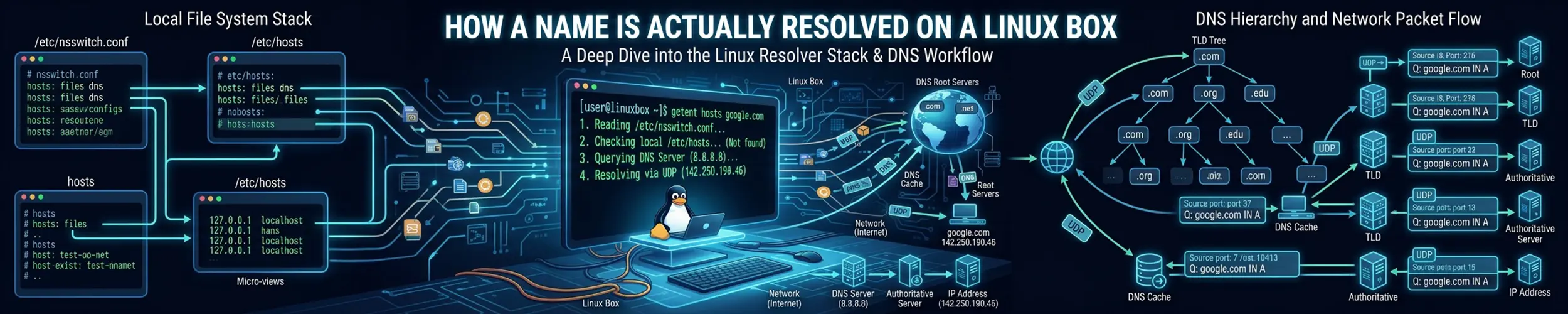
“DNS is broken” is rarely one thing. On a Linux machine, turning a name into an address passes through at least three layers before a packet leaves the box, and each can fail independently. Knowing the order is the difference between fixing it in a minute and changing /etc/resolv.conf for an hour while nothing improves.
The path a name takes
| Layer | What decides its behaviour |
|---|---|
1. Your program calls getaddrinfo() | The C library — not DNS yet |
| 2. The name service switch | /etc/nsswitch.conf: files, then DNS, then anything else |
3. /etc/hosts | Static entries, consulted first |
| 4. The resolver | /etc/resolv.conf: which server, which search domains |
| 5. A local stub, usually | systemd-resolved, dnsmasq or similar — caching and forwarding |
| 6. The real server | Your router, your provider, or a public resolver |
Layer 2 is the one people forget exists. nsswitch.conf is why a machine joined to LDAP or Active Directory can resolve names that appear in no DNS zone, and why mdns entries make .local names work without any server at all.
grep ^hosts /etc/nsswitch.conf
# hosts: files mdns4_minimal [NOTFOUND=return] dns myhostnameRead left to right: /etc/hosts first, then multicast DNS, then real DNS. That [NOTFOUND=return] means “if mDNS positively says no, stop here” — which is exactly why a genuine .local domain on a corporate network sometimes cannot be resolved at all.
The misreading: dig is not testing what your program does
dig speaks DNS directly and ignores everything above layer 4. It does not read /etc/hosts, it does not consult nsswitch.conf, and it does not use the same code path your application does. So “dig works but the application cannot connect” is not a contradiction — it is a precise clue that the problem is in a layer dig skipped. Use getent hosts to test what a program will actually see, and dig to ask what DNS itself says. When the two disagree, the answer is in /etc/hosts or nsswitch.conf.
getent hosts example.com          # the full stack, as your application sees it
dig example.com                   # DNS only, bypassing layers 2 and 3
dig +short example.com
dig @1.1.1.1 example.com          # ask a specific server, bypassing local config
dig +trace example.com            # follow it from the root, ignoring caches
resolvectl query example.com # systemd-resolved's own view, with its cacheThat set of four is the whole diagnostic. If getent fails and dig succeeds, look upward. If both fail but dig @1.1.1.1 succeeds, your configured server is the problem. If even that fails, it is not DNS — it is the network.
One correction to the first line of that block. getent hosts does go through the full name service switch, so it is far closer to what your application does than dig is — but it calls gethostbyname2(3), which is the obsolete interface. getent ahosts is the one that calls getaddrinfo(3), and only that version exercises the dual-stack merge and the address sorting your application also gets. When the two tools disagree and the difference matters, use getent ahosts.
Who owns resolv.conf
/etc/resolv.conf looks like the place to configure DNS. On most current systems it is generated, and editing it by hand produces a change that vanishes at the next network event.
ls -l /etc/resolv.conf            # a symlink? that tells you who owns it
cat /etc/resolv.conf| What you find | Who is in charge | Configure it with |
|---|---|---|
A symlink into /run/systemd/resolve/ | systemd-resolved | resolvectl, or /etc/systemd/resolved.conf |
nameserver 127.0.0.53 | systemd-resolved’s stub | Same as above |
nameserver 127.0.0.1 | A local dnsmasq or unbound | That service’s own config |
| Real addresses, file not a symlink | DHCP, NetworkManager or you | Netplan, nmcli, or the file itself |
The 127.0.0.53 address confuses everyone once. It is not a real DNS server and not a loopback trick — it is systemd-resolved’s stub listener. Every lookup goes there, is answered from cache or forwarded upstream, and /etc/resolv.conf tells you nothing about which server actually answered. For that you need to ask resolved itself:
resolvectl status                 # the real upstream servers, per interface
resolvectl statistics             # cache hits and misses
sudo resolvectl flush-caches      # after changing a record
resolvectl query example.com      # with cache and protocol details
resolvectl status is the command that answers “which DNS server is this machine really using”, and it is per-interface — a VPN and your ethernet can have different servers, with resolved choosing between them by domain. That routing is a feature and a frequent source of surprise.
Search domains and the ndots trap
search corp.example.com example.com
options ndots:5A search list lets you type db1 and reach db1.corp.example.com. ndots decides when to bother: a name with fewer than that many dots is tried against each search domain first, and only then as written.
Kubernetes sets ndots:5 by default, which means api.github.com — two dots — is first looked up as api.github.com.default.svc.cluster.local, then two or three more variants, before anyone asks the real question. Four wasted queries per lookup, on every external call. It is a well-known cause of latency, and the fix is to lower ndots or to write the name with a trailing dot (api.github.com.), which means “this is absolute, do not search”.
Caching, and why a change has not taken effect
Every record carries a TTL, and something between you and the authoritative server is honouring it — possibly several somethings. After changing a record, a stale answer can persist in your local stub, in your router, in your provider’s resolver, and inside a long-running application that cached the address itself.
dig example.com | grep -A1 'ANSWER SECTION'     # the TTL counts down
dig +trace example.com                          # from the root, no caches
dig @ns1.example.com example.com                # ask the authoritative server
sudo resolvectl flush-cachesThe last one on that list is the one you cannot flush. JVM applications historically cached DNS answers forever within the process; many runtimes and connection pools still hold an address for the life of a connection pool. If the record is right everywhere and one service still connects to the old address, restart it.
Inside containers
A container gets its own /etc/resolv.conf, written by the runtime — usually pointing at an embedded DNS server that resolves other container names and forwards the rest. Copying the host’s file in would not work, since 127.0.0.53 means something different inside a network namespace.
docker exec -it web cat /etc/resolv.conf
docker exec -it web getent hosts db
sudo nsenter -t <pid> -n dig example.com # from the host, using the host's toolsThat last line matters for minimal images, which frequently have neither dig nor getent. And note that Alpine‘s musl resolver behaves differently from glibc — it queries all servers in parallel and handles search domains differently, which is why some resolution bugs appear only in Alpine-based images.
Symptom to layer
| Symptom | Look at |
|---|---|
dig works, the application does not | /etc/hosts and nsswitch.conf — test with getent hosts |
| One name wrong, everything else fine | A stale entry in /etc/hosts |
| Works after a delay of several seconds | Search domains and ndots, or an unreachable first nameserver |
| Old address even after the record changed | TTL caching — or the application caching internally |
| Internal names fail, public names work | Split-horizon DNS; check resolvectl status per interface |
| Everything fails after connecting a VPN | The VPN replaced the resolver or the search domains |
Edits to /etc/resolv.conf disappear | It is generated — see the ownership table above |
| Fails only inside a container | The runtime’s embedded DNS, or musl vs glibc |
There is a much longer version of this page. DNS, All the Way Down follows the same path in eight stages rather than three layers, and covers what this page leaves out: the address sorting that happens before DNS is involved at all, the rest of the nsswitch.conf action syntax and what [!UNAVAIL=return] really means, systemd-resolved’s second listener and its three resolv.conf modes, why TCP port 53 stopped being an edge case, DNSSEC and the root key that changes this October, and a table of DNS advice that has quietly expired.
Related
- Networking Explained — addresses, routes and ports, and where name resolution sits among them
- Networking Basics — dig, ss and ping, and the order to try them in
- Containers — network namespaces, which is why containers resolve differently
- Alpine Linux — the musl resolver differences in more detail