

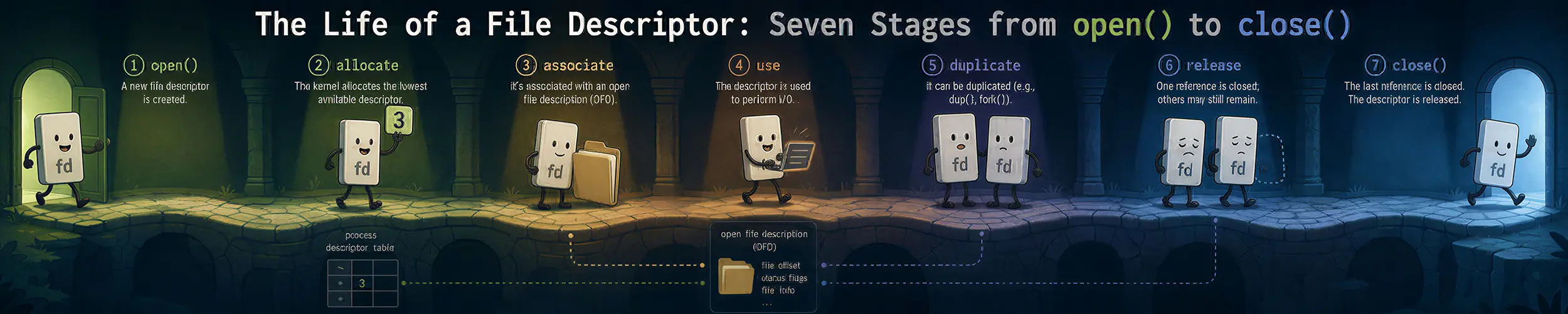
A daemon starts in under a second on one host and takes forty minutes on another — same image, same version, same configuration. No error, no log line, nothing in journalctl; the unit sits in activating (start-pre) and the process is demonstrably alive and busy. Nobody edited anything, and it is a file-descriptor problem, in the one stage of seven where the number you were given is not a number at all. A file descriptor is a small non-negative integer, and almost everything difficult about Linux plumbing comes from one fact about it: the number is yours, and the thing it points at is not. Between open() and close() sit seven stages, three levels of ownership, and one exception that has been quietly destroying people’s file locks since before most of us started.
This page goes underneath what happens when you run a program, which covers PATH, fork, exec and the dynamic linker. The Shell, in Depth owns redirection as syntax, and Containers, All the Way Down owns namespaces and the runtime. Versions, where they are the hinge of something you would act on: Linux 7.2, glibc 2.43, systemd v261. Two of the facts below changed in 2026 and one changed in 2018 and has been silently breaking things ever since.
The seven stages, and the question that halves them
- A process asks for one — and almost everything hands you a descriptor.
- What it actually points at — three levels, and which flag lives at which. The core of this page.
- Copying it —
dup, and what redirection compiles down to. - Crossing into a new process —
forkcopies,execfilters, andCLOEXECis the filter. - Handing one to a stranger — over a socket, or by reaching into another process.
- Running out — and why the error message names the wrong resource.
- Letting go — what
close()actually does, which is less than you think.
The hinge: you own the number, and you only ever rent what it points at. close() does not close a file. It drops one reference and returns. Nothing observable happens until the last reference goes — and the last reference is very often not yours.
So one question splits this article in half. Is your problem about how many numbers exist, or about who else is still holding?
Numbers. “Too many open files.” A descriptor a child should never have received. A redirection that went somewhere unexpected. A leak. These live in a table your process normally has to itself, they are fixed by changing which numbers exist, and /proc/PID/fd/ answers them. That is stages 1 to 4.
Holders. A deleted file still eating disk. epoll still firing for a socket you closed. An offset that moved when you did not move it. A lock you cannot take. These live below the number, in an object something else is also holding, and closing your reference will not touch them. /proc/PID/fd/ cannot see them; /proc/PID/fdinfo/ is where they surface. That is stages 5 to 7.
ls -l /proc/$PID/fd/          # which numbers exist, and what each points at
cat /proc/$PID/fdinfo/3 # the offset, the flags, and the per-type detailOne exception, and it is worth knowing before you start. Legacy fcntl() record locks are the one thing in Linux that really does die on the first close — of any descriptor to that file, including one that never held the lock and was opened by a library you have never read. That exception is why F_OFD_SETLK was added in Linux 3.15, and whether it surprises you is a fair test of everything below.
Stage 1 — A process asks for one
The kernel returns the lowest number not currently in use. That is the entire allocation policy, and it is why shell redirection works and why a leaked descriptor eventually shows up as a surprising number in an unrelated place.
What is worth noticing is how many things hand you one. open and socket and pipe and accept, obviously — but also eventfd, signalfd, timerfd_create, inotify_init1, epoll_create1, memfd_create and pidfd_open. A signal becomes readable. A timer becomes readable. Another process becomes a thing you can wait on. That uniformity is the reason epoll is possible at all: one waiting primitive works because everything worth waiting for was made to look like the same kind of object.
ls -l /proc/self/fd/                    # symlinks; anon_inode:[eventfd] and friends
ls -l /proc/$PID/fd/ | awk '{print $NF}' | sort | uniq -c | sort -rn | headThat second command is the leak-finder, and it belongs here rather than in stage 6: if four thousand of them are socket:[...] or the same filename, you do not have a limit problem, you have a bug.
One thing has deliberately broken the uniformity, and it marks the edge of this article. io_uring’s registered files — “direct descriptors” — are opened by the ring into the ring’s own table and referenced by index. The manual page says they avoid the regular file descriptor table entirely and are not visible to read(2) or write(2). So there now exist open file descriptions with no file descriptor at all. That is the exception that defines the rule the next six stages build, and the ring itself is somebody else’s article.
Stage 2 — What it actually points at
There are three levels, and every confusing thing in this article is a question about which one something lives at.
- The descriptor — the number, and one flag:
FD_CLOEXEC. It lives in a file descriptor table. - The open file description — the offset, the status flags, and the reference count. This is the level people get wrong.
- The inode — the file itself, which does not know or care how many times it has been opened.
An open file description is not a description of a file. It is a description of an act of opening. Two processes opening the same file produce two of them; one process calling dup produces none. Almost every wrong explanation of this subject calls the middle level “the open file table” — accurate — and then reasons about it as a property of the file, which produces a specific, predictable set of wrong conclusions.
You cannot look at a struct file. But you can watch which flags follow a copy, and that is the whole proof:
a = open(path, O_RDWR);           b = dup(a);           c = open(path, O_RDWR);

# after fcntl(a, F_SETFL, ... O_APPEND|O_NONBLOCK):
a  F_GETFL=0106002 (APPEND=1 NONBLOCK=1)
b  F_GETFL=0106002 (APPEND=1 NONBLOCK=1)   <- the dup followed it
c  F_GETFL=0100002 (APPEND=0 NONBLOCK=0)   <- the second open did not

# after fcntl(a, F_SETFD, FD_CLOEXEC):
a  F_GETFD=0x1 (CLOEXEC=1)
b F_GETFD=0x0 (CLOEXEC=0) <- not shared: it is on the NUMBERStatus flags followed the dup and not the second open, because they belong to the act of opening. Close-on-exec did neither, because it belongs to the number. Three levels, two experiments.
A defect in the canonical source, which is worth knowing because it is the source of the confusion. open(2) splits its flags two ways: “file creation flags” and “file status flags”, and it puts O_CLOEXEC in with O_CREAT and O_TRUNC — flags that affect the open operation and then evaporate. But O_CLOEXEC does not evaporate. It leaves a permanent mark at a level the man page’s taxonomy has no name for. Two categories, three levels.
Three kinds of lock, three different owners, one file
Nothing else in the kernel demonstrates the levels this cleanly, which is the only reason locking appears in an article that is not about locking.
| Attaches to | Released when | Conflicts with a second open() in the same process | |
|---|---|---|---|
flock() | the open file description | the last close of that description | yes |
fcntl() F_SETLK (legacy) | the pair (inode, process) | the first close of any descriptor to that file | no |
fcntl() F_OFD_SETLK (Linux 3.15) | the open file description | the last close of that description | yes |
The middle row is a data-corruption-class trap and it is easy to demonstrate. Take a legacy record lock on one descriptor. Open the same file a second time, in the same process, for something unrelated. Close that second descriptor, which never held a lock. Your lock is gone, with no error and no event:
parent takes F_SETLK on fd a                 -> 0
  probe from another process                 -> EAGAIN   (lock held)
parent opens b, a second unrelated open of the same file
  probe                                      -> EAGAIN   (still held)
parent closes b -- b never held any lock
probe -> SUCCEEDED (the lock is gone)fcntl_locking(2) documents it plainly: if a process closes any descriptor referring to a file, all of that process’s locks on that file are released, regardless of which descriptor they were taken on. A library you did not write, opening a config file to read one value, is enough. Rerun the same program with F_OFD_SETLK and the lock survives.
cat /proc/locks # second column: POSIX, FLOCK or OFDLCK — all three, side by sideThe other place the levels bite: epoll
Nearly everyone, including me before this article was researched, will tell you that epoll registers against the open file description. epoll(7) is more precise, and the precision is the whole story: the key is the combination of the descriptor number and the open file description.
Three consequences fall out of that. Adding the same number twice gives EEXIST. Adding a dup() of it — a different number, the same description — succeeds, which is the documented way to register two different event masks on one socket. And removal happens when all descriptors on that description close, so your registration outlives your close().
That last one is a use-after-free waiting to happen, and it has a fingerprint you can grep for. The epoll instance’s interest list names descriptor numbers; if one of them no longer exists in fd/, you are holding a registration for something you thought you had closed:
comm -13 <(ls /proc/$PID/fd | sort) \
<(awk '/^tfd:/{print $2}' /proc/$PID/fdinfo/$EPOLLFD | sort)Anything that prints is a stale registration. EPOLL_CTL_DEL before you close, always. (And one clause worth having: epoll cannot watch a regular file — epoll_ctl returns EPERM — which invalidates roughly half the epoll tutorials on the internet, whose examples open a file.)
Stage 3 — Copying it
dup(a) gives you a second number pointing at the same open file description. Not a second opening — a second reference. The offset is shared, the status flags are shared, and the reference count went up by one.
This is what shell redirection is. 2>&1 is a dup2: descriptor 2 is made to point at whatever descriptor 1 points at, one description, one offset. 2>file 1>file is two separate open calls: two descriptions, two offsets, and the two streams overwrite each other. That single distinction accounts for a great deal of shell confusion, and it is entirely a question of levels. The Shell, in Depth owns the syntax and the order the redirections are applied in; this is what they compile down to.
dup(a)                       # lowest free number
dup2(a, 7)                   # exactly 7, closing 7 first — atomically
dup3(a, 7, O_CLOEXEC)        # same, and sets close-on-exec in the same step
fcntl(a, F_DUPFD, 10)        # lowest free number >= 10
fcntl(a, F_DUPFD_CLOEXEC, 10)The atomicity in dup2 is the reason it exists rather than being close() then dup(): the man page says as much, because the two-step version races. dup3 exists because dup2 cannot set close-on-exec, and setting it afterwards races too.
Two asymmetries that catch people. dup2(fd, fd) on a valid descriptor is a no-op that returns fd; dup3(fd, fd, ...) fails with EINVAL. Same call shape, opposite behaviour, which breaks “normalise my descriptors” loops written with the newer one. And dup and dup2 clear FD_CLOEXEC on the copy — that is the mechanism, but it is also a leak. A dup of a carefully O_CLOEXEC-opened descriptor survives exec while its protected sibling does not, and both refer to the same open file description. The protection is on the number; the thing being protected is not.
Stage 4 — Crossing into a new process
fork copies the descriptor table verbatim and the copies point at the same open file descriptions, so the child’s lseek moves the parent’s offset. exec keeps the table too — and filters it. FD_CLOEXEC is the entire filter.
after fork,  child sees fds: 3 4 5 9      # all of them
child offset of fd 3 = 11
parent offset of fd 3 after the child seeked = 11     # shared description

after exec,  child sees fds: 3 5          # 4 and 9 were O_CLOEXEC
# 5 was dup(4) — and dup cleared the flagThat last line is stage 3’s leak, observed. It is also why the guidance is to set close-on-exec at creation rather than afterwards. open(2) gives the reason in one sentence: setting FD_CLOEXEC with a separate fcntl does not suffice in a multithreaded program, because another thread can fork and exec in the window between the two calls.
Every creation call has a variant for this, and the list is worth having in one place: O_CLOEXEC, SOCK_CLOEXEC, EPOLL_CLOEXEC, MFD_CLOEXEC, EFD_CLOEXEC, SFD_CLOEXEC, TFD_CLOEXEC, IN_CLOEXEC, pipe2(O_CLOEXEC), dup3(O_CLOEXEC), F_DUPFD_CLOEXEC, and fopen(path, "re"). They all exist for the same race.
And one thing that looks like it should work and silently does not. fcntl(fd, F_SETFL, flags | O_CLOEXEC) returns 0 and changes nothing. On Linux, F_SETFL can only alter O_APPEND, O_ASYNC, O_DIRECT, O_NOATIME and O_NONBLOCK; every other flag you pass is accepted and discarded, with no error. Close-on-exec is a different operation on a different level: F_SETFD.
One correction to a thing this article has so far let stand. The descriptor table is not, strictly, per-process. It is a reference-counted object that a process normally has to itself but which is shared when a task is created with CLONE_FILES — which is what threads use, and which a plain clone() can request without threads being involved. Two distinct processes can share one table, and then one of them calling close(3) makes the other’s descriptor 3 return EBADF. It is rare, but it is the reason the hinge says “you own the number” rather than “the process owns the number”, and unshare(2) exists to split one.
Stage 5 — Handing one to a stranger
This is where the article crosses its own hinge, from numbers you own to holders you do not know about. SCM_RIGHTS over a unix domain socket passes a descriptor to an unrelated process — not a copy of the file, and not the number, but the reference. The receiver gets whatever number is free in its own table, pointing at the sender’s open file description:
parent opens a file as fd 5, seeks to 7, sends fd 5 over a socketpair

CHILD received fd 3 via SCM_RIGHTS; cat /proc/self/fdinfo/3:
pos:    7                              # the sender's offset
CHILD lseeks it to 20
PARENT: my fd 5 offset is now 20 # the child moved my offsetThis is how a privileged helper opens a port and hands it to an unprivileged worker, and how socket activation works. It also means a unix socket’s fdinfo has an scm_fds: line — descriptors currently in flight in its queue, keeping open file descriptions alive while no process holds them at all.
pidfd_getfd() goes further, because there is no relationship at all: no shared ancestry, no socket, no cooperation. You open a handle to a process and take a descriptor out of it.
int pidfd = pidfd_open(target_pid, 0);        /* Linux 5.3 */
int mine = pidfd_getfd(pidfd, 4, 0); /* Linux 5.6 — their fd 4, now mine */“Without cooperation” is right; without permission is not. The call is gated by a ptrace-attach-strength check, so YAMA’s ptrace_scope, container policy and CAP_SYS_PTRACE all apply. Expect EPERM more often than not.
Worth printing, because the manual page is wrong about it. Both pidfd_open(2) and pidfd_getfd(2) still say glibc provides no wrapper and you must use syscall(2). That has been untrue since glibc 2.36, in August 2022. openat2(2) says the same thing, untrue since glibc 2.43 in January 2026. You can check in one command:
nm -D /lib/x86_64-linux-gnu/libc.so.6 | grep -E 'pidfd|openat2'Stage 6 — Running out
“Too many open files” is the most misdiagnosed error in Linux administration, and the reason is that it names a resource nobody is counting the way you think.
Read the errno first. EMFILE — errno 24, “Too many open files” — is per-process: you hit RLIMIT_NOFILE. ENFILE — errno 23, “Too many open files in system” — is the system-wide one, and you will almost never see it. Two words apart in the message, and they send you to completely different places.
The limit itself is a pair. The soft limit is enforced; the hard limit is the most an unprivileged process may raise its own soft limit to. systemd’s default is 1024:524288, and the split is deliberate rather than conservative: select() cannot represent a descriptor above FD_SETSIZE, which is 1024, so a program using it corrupts its own stack above that. The soft limit stays at 1024 to protect code that has not been told; the hard limit is raised so anything that knows better can lift its own without privileges.
Above both sits fs.nr_open, the ceiling on the ceiling — the kernel default is 1048576, and setrlimit above it fails with EPERM rather than something informative. And fs.file-max, the system-wide count, is a historical artefact on a systemd machine: systemd v240 set it to effectively unlimited at boot in December 2018, on the argument that memory cgroups already account for this properly. On anything that is not systemd, it is still whatever the kernel computed from RAM and it is still a real ceiling — on one test machine here, 820117, not infinity.
Never ask what the limit is. Ask what started the process.
There is no table of per-distribution defaults in this article, and the reason is stronger than usual: on one machine at one moment there are several correct answers and most of them differ. The same Ubuntu release gives one set of numbers on bare metal and a completely different set inside a container. The distribution is not even the largest source of variance — the asker is.
Started by systemd. limits.conf does not apply, because there is no PAM session. Red Hat states this outright, and ignoring it is the classic wasted afternoon.
systemctl show foo.service -p LimitNOFILE -p LimitNOFILESoft
systemctl show -p DefaultLimitNOFILE
# change it with LimitNOFILE=1024:524288 in a drop-in, then:
sudo systemctl daemon-reexec && sudo systemctl restart fooStarted from a login shell. Then limits.conf and limits.d do apply, through pam_limits — and only if the session actually went through PAM, which su without - and most non-interactive paths do not. ulimit -Sn and ulimit -Hn are statements about your shell and nothing else.
Started in a container. The runtime sets it — which is why a limit you never configured appears inside your pod, inherited from containerd.service or crio.service on the node.
Whatever the answer, verify it on the process, not the config. This is the only one of these that cannot lie to you:
grep 'open files' /proc/$(pidof foo)/limits
prlimit --pid $(pidof foo)
ls /proc/$(pidof foo)/fd | wc -l # and how many it actually holdsIt matters more than it used to. Since Go 1.19, any Go program importing os raises its own soft limit to the hard limit at startup — so a unit saying 1024:524288 gives that process 524288, silently — and then restores the original soft limit for any non-Go child it execs. Parent and child have different limits and neither matches the unit file.
One more trap, because it wastes days. inotify_init1() also returns EMFILE when fs.inotify.max_user_instances is exhausted — default 128, and the budget is per user ID on the host. On a Kubernetes node where most containers run as UID 0, every container shares one pool of 128. The errno names file descriptors; the resource is not file descriptors and the owner is not your process.
ls -l /proc/*/fd 2>/dev/null | grep -c 'anon_inode:inotify'
sysctl fs.inotify.max_user_instancesThe general rule: when /proc/PID/fd is nearly empty and EMFILE is nonetheless real, stop looking at the process.
Stage 7 — Letting go
close(2) makes three statements that sit awkwardly together, and the awkwardness is the point. The kernel releases the descriptor early, before the steps that can fail. Retrying after a failure is therefore wrong, because the number may already have been reused by another thread. And failing to check the return value can silently lose data, notably on NFS and against disk quotas. Taken together: you must check the return value, and you must not act on it. POSIX.1-2024 blessed the other behaviour, in which the descriptor stays open on EINTR; Linux does not do that and the man page says there are no plans to change.
For closing many at once there is one call, and it is the fix for a pattern you will still find in code written last year:
close_range(3, ~0U, 0);                    /* Linux 5.9, glibc 2.34 */
close_range(3, ~0U, CLOSE_RANGE_CLOEXEC); /* 5.11: mark, do not close */Until recently it was itself O(range), so a huge RLIMIT_NOFILE made even the good version slow. In Linux 7.0, released 12 April 2026, it became O(active descriptors) — it walks the open-descriptor bitmap rather than scanning the range — which turned the one-syscall fix from merely fast into free.
And then the part that is not about your process at all. Unlinking a file that something still has open does not free anything. The directory entry goes; the inode and its blocks stay until the last descriptor closes. This is the classic disagreement between df and du, and it is why restarting the process fixes a full disk that deleting the log did not.
sudo lsof +L1                    # "+L1" means: link count below 1
# COMMAND  PID  FD TYPE  DEVICE  SIZE/OFF NLINK   NODE NAME
# python3 1707  3r  REG   254,0 209715200     0 950437 /tmp/big.bin (deleted)

sudo cp /proc/1707/fd/3 /tmp/recovered # still readable while the holder livesThe signal is the NLINK column reading zero, not the “(deleted)” suffix — +L1 literally selects files whose link count is below 1. And the last line is the reason to check before killing anything: while a holder survives, /proc/PID/fd/N is not merely a diagnostic, it is a recovery path.
A worked diagnosis
Back to the daemon from the top of the page: forty minutes in activating (start-pre) on one host, under a second on another, nothing in the journal, and a process that is alive and busy.
$ strace -c -f -p $(pidof foo)
% time     seconds  usecs/call     calls    errors syscall
100.00 41.203000 0 148000000 148000000 closeA hundred and forty-eight million close() calls, every one of them returning EBADF. It is closing descriptors that do not exist. That is stage 7 behaviour caused by a stage 6 number, so ask stage 6 what the number is:
$ grep 'open files' /proc/$(pidof foo)/limits
Max open files            1073741816           1073741816           files

$ systemctl show foo -p LimitNOFILE
LimitNOFILE=infinity

$ sysctl fs.nr_open
fs.nr_open = 1073741816There it is, and note that nobody edited the unit file. LimitNOFILE=infinity does not mean a number; it means “whatever fs.nr_open says”. systemd v240, in December 2018, raised fs.nr_open toward INT_MAX at boot — the commit message reasons that a system with memory cgroups does not need extra hard limits on descriptors, because they are accounted for anyway. So a unit written in 2017 meaning about 220 silently began meaning about 230. A thousandfold change, with no edit.
The daemon then does the traditional pre-exec hygiene loop — for (fd = 3; fd < limit; fd++) close(fd); — against a table holding four entries.
The arithmetic is worth doing, because it explains why the reported symptom ranges from “slow” to “broken”. A close() on an unused descriptor costs about 300 nanoseconds on a fast machine with mitigations off. At 220 that is a third of a second: invisible, which is why this went unnoticed for years. At 230 it is about five minutes. On an older CPU where a syscall round trip runs three to five microseconds, the same loop is a little over an hour.
Two fixes, and take both. In the unit, replace infinity with a pair — LimitNOFILE=1024:524288, which is systemd’s own default and is what container runtimes moved back to after this bit them. In the program, one syscall instead of a billion:
close_range(3, ~0U, 0); /* Linux 5.9, glibc 2.34 */The moral generalises well past descriptors. A limit is not only enforced against you. It is published to you — and something downstream is going to read it as a size. Any bound you set is also an announcement, and somewhere a loop, an array or a preallocation is treating your announcement as an instruction; that is the same shape as a maximum request size becoming a buffer, or a retention period becoming a disk reservation. Nobody changed the unit file here; the meaning of the word in it changed underneath. And the stale writing on this subject is wrong in one direction, which is why it kept recommending limits.conf, fs.file-max and ulimit -n for a daemon: it treats a file-descriptor limit as configuration, when it is inheritance — a per-process attribute handed down a chain from whatever started the process, like an environment variable, not a dial on the wall. Any page that tells you to edit a file and reboot without first asking what started the process is describing a machine that stopped existing in 2018.
The rest of the page compresses to four lines. You own the number; you rent what it points at — if something surprising survives your close(), disk space, an epoll registration, an offset that moves, you were never the last holder, and no amount of closing harder will help. Ask which level: the number carries exactly one flag; the open file description carries the offset and the status flags and is shared by dup, fork, SCM_RIGHTS and pidfd_getfd, and by nothing else; the inode carries the data. Two directories, two halves: /proc/PID/fd/ tells you which numbers exist, /proc/PID/fdinfo/ tells you about the things underneath them — with one caution, that fdinfo‘s flags field folds FD_CLOEXEC in as O_CLOEXEC, so mask off 02000000 before deciding two descriptors differ. And read the errno, not the message: EMFILE is about your process, ENFILE is about the machine, and sometimes EMFILE is about neither and the resource that ran out belongs to a user ID you are sharing a host with.
Related reading
- What Happens When You Run a Program — the article this page sits underneath
- The Shell, in Depth — redirection as syntax, and the order the redirections are applied in
- lsof — the reference for the tool this page keeps reaching for
- The Life of a Write — what happens below the descriptor once you write to it
- Signals — the other mechanism whose behaviour changes depending on who is holding what
- The Life of a Login — where
limits.confdoes and does not apply, in detail