

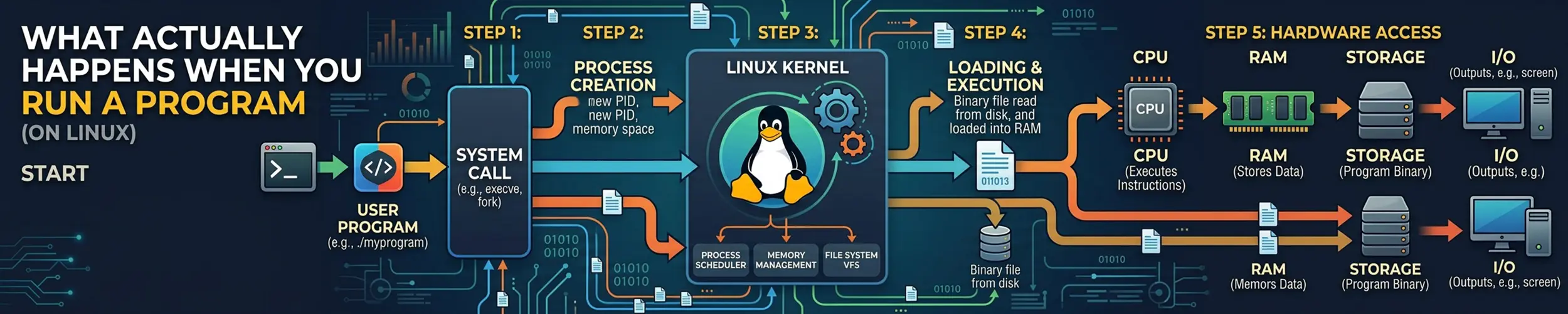
You type ls and press enter. Somewhere between that and the listing appearing, the shell created a second copy of itself, replaced that copy’s entire contents with a different program, and a piece of code you have never heard of went and found four shared libraries on disk and wired them in.
That sequence is worth knowing, because almost every startup error you will ever meet — command not found, Permission denied, No such file or directory on a file that plainly exists, error while loading shared libraries — is a specific step of it failing.
Step 1: finding the file
If what you typed contains no slash, the shell searches PATH in order and takes the first match. That is all PATH is — a colon-separated list of directories, tried left to right.
echo "$PATH"
type -a python3      # every match, in the order they would be found
which -a python3type -a is the better of the two, because it also tells you when the name is a shell builtin, a function or an alias rather than a file at all — which is why which cd finds nothing.
Bash also caches these lookups, so installing a new version of something into an earlier PATH directory can leave you running the old one until hash -r clears the cache.
Step 2: fork
Linux has no call that means “start this program”. It has one that duplicates the calling process, and another that replaces a process’s contents with a different program. Running a command is those two, in order.
fork() produces a near-identical child: same memory contents, same open file descriptors, same working directory, same environment. The only immediate difference is the return value, which is 0 in the child and the child’s PID in the parent — that is how each half knows which it is.
Copying the whole address space would be absurdly expensive, so the kernel does not. Both processes share the same physical pages, marked read-only, and a page is copied only when one of them writes to it — copy-on-write. A fork is therefore cheap regardless of how much memory the parent has.
The inherited file descriptors are the important part. This is exactly how redirection and pipes work: between the fork and the exec, the shell rearranges the child’s descriptors — pointing descriptor 1 at a file, or at the write end of a pipe — and the program that arrives next simply writes to descriptor 1 knowing nothing about where it goes.
Step 3: exec
execve() keeps the process — same PID, same descriptors, same parent — and throws away everything inside it, replacing the memory with a new program loaded from disk. On success it never returns, because there is nothing left to return to.
The kernel reads the first bytes of the file to decide what it is dealing with. Two cases matter:
| First bytes | Means | Kernel does |
|---|---|---|
\x7fELF | A compiled binary | Maps its segments into memory |
#! | A script | Runs the interpreter named on that line, with the script as an argument |
The second case is the shebang, and it is the kernel doing the work, not the shell. ./deploy.sh becomes /bin/bash ./deploy.sh before anything in the script runs.
“No such file or directory” on a script that is definitely there is almost never about the script. It is the kernel failing to find the interpreter named after #!, and reporting that failure with the name of the file you ran. The two usual causes are a path that does not exist on this machine (#!/usr/local/bin/python when it lives in /usr/bin) and a file saved with Windows line endings, where the interpreter path silently gains a trailing carriage return and becomes /bin/bash\r. Check with head -1 script.sh | cat -A — a ^M$ at the end is your answer, and dos2unix or sed -i 's/\r$//' is the fix.
For the same reason, prefer #!/usr/bin/env python3 over a hard-coded path: env searches PATH, so the script works on a machine that puts the interpreter somewhere else.
Step 4: the dynamic linker
Most binaries are not self-contained. They are compiled against shared libraries and carry a list of what they need, plus the path of a small program whose job is to find those libraries and connect them up. The kernel starts that program — the dynamic linker — rather than your binary directly.
file /usr/bin/ls          # ELF 64-bit LSB pie executable, dynamically linked...
ldd /usr/bin/ls # what it needs, and where each was foundldd output ending in => not found is the whole diagnosis for error while loading shared libraries. The search order is worth knowing, because it is the order in which you can intervene:
RPATH/RUNPATHbaked into the binary at build timeLD_LIBRARY_PATHfrom the environment- The cache built from
/etc/ld.so.confand its.ddirectory - The default directories,
/liband/usr/lib
ldconfig -p | grep libssl     # what the cache currently knows about
sudo ldconfig # rebuild it after dropping a library inLD_LIBRARY_PATH is the right tool for testing a build in a strange location and the wrong one for making a service work permanently — put the directory in /etc/ld.so.conf.d/ and run ldconfig instead, or the fix vanishes the moment something starts outside your shell.
A statically linked binary skips this stage entirely; that is what “no dependencies” means for a Go binary, and why ldd on one says not a dynamic executable.
Watching it happen
None of this is theoretical — you can see every step.
# every file the program tries to open, and whether it succeeded
strace -f -e trace=execve,openat ls 2>&1 | head -30

# what the dynamic linker is deciding, without running the program
LD_DEBUG=libs ls 2>&1 | head -30

# environment and descriptors of something already running
cat /proc/self/cmdline | tr '\0' ' '
ls -l /proc/1234/fdstrace on a failing startup is usually faster than reasoning about it. The last openat before the process gives up names the file it could not find, which is generally the whole answer.
Step 5: exit, and being reaped
When the program finishes it returns a status, and the kernel keeps a small record of that status until the parent asks for it with wait(). Between those two moments the process is a zombie: it holds no memory and runs no code, but its PID cannot be reused.
Zombies are normal and momentary. A pile of them means the parent is not calling wait(), and the fix is to restart or fix the parent — you cannot kill a zombie, because it is already dead.
If a parent exits first, its children are re-parented to PID 1, which reaps them. That is why a process started from a terminal that then closes can keep running with a parent PID of 1.
Symptoms and what they mean
| What you see | Which step failed | Check |
|---|---|---|
command not found | PATH search | type -a name, echo $PATH |
| Runs the old version after upgrading | Shell’s lookup cache, or PATH order | hash -r, then type -a |
Permission denied | exec, missing execute bit | ls -l, then chmod +x |
No such file or directory on a file that exists | The shebang’s interpreter | head -1 f | cat -A |
bad interpreter: ^M | Windows line endings | dos2unix |
error while loading shared libraries | Dynamic linker | ldd binary |
| Works in your shell, fails as a service | Environment not inherited | systemctl show -p Environment |
Exec format error | Wrong architecture, or no shebang | file binary |
Many processes in state Z | Parent not reaping | ps -eo pid,ppid,stat,comm |
The two rows worth internalising are the shebang one and the shared-library one. Between them they account for most of the confusing failures, and both are diagnosed in a single command.
The descriptors this page keeps mentioning — inherited across fork, rearranged before exec, still open in /proc/1234/fd — have a page of their own. The Life of a File Descriptor follows one from open() to close() in seven stages: the three levels behind the number and which flag lives at which, what 2>&1 compiles down to, exactly what exec filters out that fork kept, and why closing a descriptor usually closes nothing at all.
And one layer below all of it: every step on this page is a system call, and the trace above prints their names rather than the ones you wrote. The Life of a System Call is the long one for that boundary — why strace says openat when you wrote open() and clone when you wrote fork(), why a program can be working hard and leave almost nothing in a trace, and why the errno your program finally prints carries no information at all about which of four parties actually answered it.
Related reading
- Processes and memory — what the thing being created actually consists of
- The shell — expansion, quoting, and what happens before the fork
- How packages work — where those shared libraries came from
- Processes: ps, top and kill — inspecting the result
- File permissions — the execute bit, and setuid