

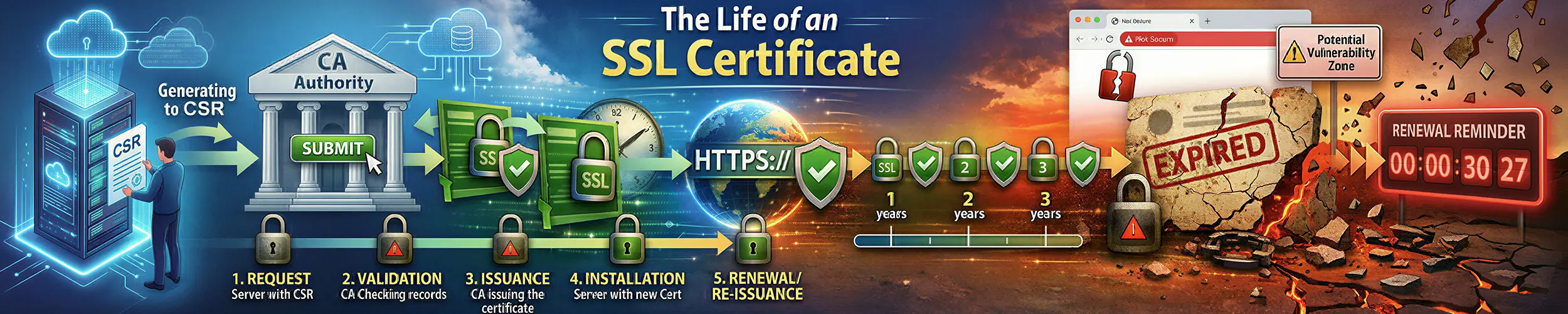
Here is a machine whose certificate renewal succeeded, on a host that has been renewing correctly for two years.
$ sudo openssl x509 -in /etc/letsencrypt/live/example.com/cert.pem -noout -serial
serial=031E2CD68EC47CA6

$ echo | openssl s_client -connect example.com:443 -servername example.com 2>/dev/null \
    | openssl x509 -noout -serial
serial=51DD97E27BA2458CThe certificate on disk is not the certificate on the wire. The renewal ran, wrote a new file, repointed a symlink and exited zero; nginx is still holding the one it opened at startup, and will go on serving it until something reloads it. Nothing has reported an error and nothing will, right up until the old one expires.
That is the shape of almost every certificate failure that happens at three in the morning, and it is not really about certificates. This page follows one from the first request to a certificate authority through to the moment it is replaced, in six stages, from the operator’s side of the wire. The verifier’s side — how a chain is checked, why curl and Chrome can disagree, what replaced OCSP, the ceiling on lifetimes — is What Happens When You Type a URL, and what a certificate asserts is What a TLS Certificate Actually Proves. This page is about getting one and keeping one, and it uses Let’s Encrypt and certbot throughout, because Let’s Encrypt still recommends most people start with Certbot; where your client differs, the checklist at the end tells you which one you actually have.
The six stages.
- The account — one key, made once, and everything the CA remembers is filed under it
- The order — you name the identifiers; the CA decides what you must prove, and may decide “nothing”
- The authorisation, and the challenge inside it — control proved at one instant, recorded in an object that outlives it
- Finalisation — the CSR, the second key, and everything the CA throws away
- Deployment — the files, the chain, and the reload nobody tests
- Renewal — who decides when, and what “success” does not prove
The hinge. There are two private keys and they never meet. The account key is your identity at the certificate authority: it signs every request, and everything the CA remembers about you — your orders, your authorisations, your rate limits, your right to say “this certificate replaces that one” — is filed under it. The certificate key is your identity on the wire: your visitors verify it, and the CA has never seen its private half.
So: every failure sits on one side of that line, and the side tells you which half of this page you need. If the message names an account, an order, an authorisation, a rate limit or a replaces field, it belongs to the account key — stages 1 to 3 — and nothing you change in nginx will move it. If the failure shows up on the wire — a name that does not match, a chain that will not build, a certificate that expired, a file that was never reloaded — it belongs to the certificate key, stages 4 to 6, and the CA finished its work correctly.
The one place the line genuinely blurs is revocation, and it blurs by design. RFC 8555 accepts a revocation request signed by either key. Which is the uncomfortable half of the rule, and the subject of the short section after stage 6: whoever steals your certificate key can revoke your certificate without ever touching your account.
Stage 1: The account
Registration happens once, and produces one thing that matters: a key pair. Everything else you associate with an ACME account is decoration.
# the account key — identifies you to the CA, never leaves the machine
/etc/letsencrypt/accounts/<ca>/directory/<id>/private_key.json

# the certificate key — proves possession on the wire
/etc/letsencrypt/live/example.com/privkey.pemOn a stock install those two are not even the same algorithm — the account key is RSA and the certificate key is ECDSA P-256 by default. Different files, different lifecycles, different jobs. Look at the two paths above on your own machine now; the rest of this page assumes you can tell which one a given failure is about.
The email address you gave is not your account. It is contact metadata attached to a key. Let’s Encrypt stopped sending expiry-warning emails on 4 June 2025 and deleted the stored addresses, so if part of your plan is “I will get a warning”, that part no longer exists.
What the account key is worth is easier to see in terms of what is lost with it. Lose it and you lose every cached authorisation, the ability to tell the CA that one certificate replaces another, and the rate-limit exemptions renewals depend on — and you keep every file in live/, all of which still work. That asymmetry is why the account key belongs in your backups and almost never is.
One protocol note, because it saves you an afternoon: almost every “GET” in ACME is a POST. Fetching an order, an authorisation or the certificate itself is a signed POST with an empty body; the only unauthenticated GETs are the directory, the nonce endpoint and the renewal-information endpoint from stage 6. You cannot curl your own order.
Stage 2: The order
You POST a list of identifiers — the names you want on the certificate — and the CA replies with an order object whose state is the field to look at: pending if there is something for you to prove, ready if there is not. An order can arrive with nothing to do at all, because the CA already holds a valid authorisation for every name on it, and the client skips stage 3 entirely. That is not an edge case; it is what most renewals do. Two things the CA decides here that people expect to control.
The profile decides the lifetime, and you pick the profile. Let’s Encrypt enabled ACME profiles on 9 January 2025, and they are the organising fact of everything that follows — lifetime, how long an authorisation is reused, and which root you chain to are properties of a profile rather than of “a Let’s Encrypt certificate”.
| Profile | Certificate lifetime | Authorisation reused for |
|---|---|---|
classic | 90 days | 30 days |
tlsserver | 45 days, since 13 May 2026 | 7 hours |
shortlived | 160 hours — just over six days | 7 hours |
Note what that does to the number everybody repeats. “Certificates are valid for ninety days” is true of one profile out of three, and classic is on a published demolition schedule of its own: 64 days from 10 February 2027, and 45 days from 16 February 2028. Those are Let’s Encrypt’s dates and they are ahead of the industry ceiling, which is why they will reach you first.
Six-day certificates and certificates for bare IP addresses went generally available on 15 January 2026, both through the shortlived profile. There is no long-lived IP option; an IP certificate is a short-lived certificate by rule.
The rate limits are per account and per registered domain, and only one of them realistically bites you. Renewals are already exempt from the two large ones — new orders per account, and certificates per registered domain — which leaves the small one:
- 5 duplicate certificates — the exact same set of identifiers — per 7 days. Renewals are not exempt from this one.
- 5 failed authorisations per identifier per account per hour, which is what a broken challenge setup runs into.
- Renewals coordinated through the renewal-information endpoint in stage 6 are exempt from all limits, including that first one.
Do the arithmetic the tutorials never do. Five duplicates per seven days, against a certificate that lives for six, leaves almost no room for a retry loop — the real argument for letting the CA schedule your renewals rather than a number you picked.
Stage 3: The authorisation, and the challenge inside it
This is the stage people mean when they say “ACME”, and the structure is the part they get wrong. A challenge is a field inside an authorisation. The authorisation is the durable object: it names one identifier, has a status and an expiry, and goes on existing after the challenge that satisfied it is finished. That is the whole reason a renewal can complete having proved nothing: the authorisation is what the CA remembers; the challenge is a thing that happened once.
Which challenge type to use is a shorter question than the corpus makes it. Use http-01 unless you need a wildcard, or you geoblock, or you cannot serve port 80 — then use dns-01. tls-alpn-01 exists, and Let’s Encrypt describes it as best suited to authors of TLS-terminating reverse proxies, which is a polite way of saying it is not for you.
There is now a fourth. dns-persist-01, authorised by CA/Browser Forum ballot SC-088v3 in October 2025, replaces the per-issuance TXT token with a standing record at _validation-persist.example.com naming the CA and your account URI, and with policy=wildcard it issues wildcards. Let’s Encrypt targeted production for the second quarter of 2026; I could not confirm that it has shipped, so treat it as coming rather than available.
Note what dns-persist-01 does to the hinge. dns-01 protects your DNS provider credentials; dns-persist-01 binds authorisation to your account key. It moves the thing worth stealing — and few pages say plainly that dns-01 works by shipping a DNS provider API token to your ACME client, a credential very often more powerful than the certificate it exists to obtain, and the one nobody audits.
Your own curl proves nothing
Since CA/Browser Forum ballot SC-067v3 passed in August 2024, public CAs must validate from multiple network perspectives; Let’s Encrypt uses five, and requires four of them to agree. So the standard debugging move — fetch your own challenge URL from your own laptop and conclude the setup is fine — tests one perspective out of five and settles nothing. When validation fails, the error names something no tutorial has prepared you for:
During secondary validation: Remote PerformValidation RPC failedThat is a geoblock, a regional firewall rule, or an anycast setup where some points of presence do not have your challenge file. Let’s Encrypt’s own advice for anyone who must geoblock is to move to dns-01, which is validated from the DNS side.
Reuse, and why you cannot see it
Once an authorisation is valid, the CA keeps it, and any later order naming that identifier is satisfied without a challenge. On classic that is thirty days; on the other two profiles it is seven hours; at Google Trust Services it is eight days in practice against a published two hundred. The number is not the point, because the number is CA policy, frequently undocumented, and on a schedule — classic‘s thirty days becomes ten in February 2027 and seven hours in February 2028. The durable statement is that authorisation reuse is real, invisible and never to be relied on.
Invisible is meant literally. Point a working certificate’s identifier at an address where nothing listens, force a renewal, and this is the entire output:
Renewing an existing certificate for example.test and www.example.test
Successfully received certificate.The words “reuse” and “cached” appear nowhere in that, and nowhere in the full debug log either. Nothing answers “was my authorisation reused?”, so a renewal that succeeds is not evidence that your challenge setup works — only that it worked at some point inside a window whose length you probably cannot state. The way to test a challenge setup is to request a certificate for a name that has never been authorised, a throwaway subdomain, which forces a real challenge. Stage 6 explains why the command everybody runs instead proves even less.
Stage 4: Finalisation
You POST a certificate signing request to the order’s finalize URL; the order goes to processing and then to valid with a certificate URL on it, which you fetch. This is where the second key first appears: the CSR carries the public half of your certificate key, and the private half is generated on your machine and never transmitted. It is also where the hinge is easiest to see, because the CA throws away most of what you send.
Let’s Encrypt takes the public key and the subject alternative names. Requested validity dates are ignored — the profile decides. And the Subject is discarded entirely:
$ openssl x509 -in cert.pem -noout -subject
subject=Empty. Modern publicly-trusted certificates have no Common Name, because the CN stopped being used for name matching years ago. Any page telling you to set a CN in your CSR is describing 2015, and any script parsing the CN out of a certificate to find out what it covers is reading the wrong field — the names are in the SAN extension.
Since 13 May 2026, certificates issued under the tlsserver and shortlived profiles chain to Let’s Encrypt’s Generation Y hierarchy — ISRG Root YR (RSA 4096) and ISRG Root YE (ECDSA P-384), announced 24 November 2025 — rather than to the X1 and X2 roots that older clients know. Those intermediates deliberately omit the TLS Web Client Authentication extended key usage, and the temporary tlsclient profile that preserved it was retired on 8 July 2026. If anything of yours used a Let’s Encrypt certificate for client authentication — mutual TLS to an internal service — it stopped working this July, and that is stage 4, not stage 5.
Stage 5: Deployment
The CA’s work is finished. Yours is the part that breaks. Certbot writes four files, and the choice between two of them is the most common misconfiguration on the public internet:
cert.pem       1 certificate   — your leaf, alone
chain.pem      1 certificate   — the intermediate, alone
fullchain.pem  2 certificates  — leaf + intermediate      <- this one
privkey.pem — the certificate keyServe fullchain.pem. Serving cert.pem from nginx, Apache or a Go service puts one certificate on the wire and leaves the verifier to find the intermediate on its own:
SERVING cert.pem  (1 certificate on the wire)
  openssl s_client        Verify return code: 21 (unable to verify the first certificate)
  python ssl              REJECTED — unable to get local issuer certificate
  Go crypto/tls           REJECTED — x509: certificate signed by unknown authority
  openssl, with the intermediate already in its trust store
                          Verify return code: 0 (ok)     <- the whole explanation

SERVING fullchain.pem  (2 certificates on the wire)
everything acceptedThat last line under cert.pem is the part the corpus gets wrong. It is not that some clients are lenient about missing intermediates. It is that some verifiers already have the intermediate — cached, installed locally, or fetched on demand from the authority-information-access URL, which browsers do and OpenSSL, curl, Python and Go do not.
Two consequences follow, and they are why this reaches production rather than being caught in testing. The failure lands hardest on machine-to-machine traffic — your monitoring, your webhooks, a partner’s API client — while a browser papers over it. And Let’s Encrypt deliberately randomises which intermediate signs your certificate, to discourage intermediate pinning, so “it worked yesterday” is not evidence of anything except which intermediate you happened to draw.
The second hinge, and it is the one from the opening of this page. Your server resolved the name once, at startup.
live/cert.pem is a name — a symlink into archive/. Renewal writes a new file and repoints that name. A running nginx is holding the old thing, and will go on holding it, serving a certificate that no longer exists at that path, until something makes it look the name up again.
1. before renewal
     on disk : serial=51DD97E27BA2458C
     on wire : serial=51DD97E27BA2458C

2. certbot: "Successfully received certificate."
     live/cert.pem -> ../../archive/example.test/cert3.pem

3. after that success
     on disk : serial=031E2CD68EC47CA6
     on wire : serial=51DD97E27BA2458C     <- still the old one

4. nginx -s reload
on wire : serial=031E2CD68EC47CA6This is exactly the distinction in How a Path Becomes a File, arriving in a different subject: hold a name and you hold nothing, because the binding can be re-made underneath you; hold a thing and you hold it, whatever happens to its names. Certbot changed the name. Nginx is holding the thing.
Whether anything reloads is not a matter of remembering to configure a hook. It depends on whether certbot has an installer. Run it with --nginx or --apache and it reloads the server itself, recording installer = nginx in the renewal configuration. Run it with certonly and there is no installer and no hook — nothing will ever reload anything, and nothing warns you:
$ grep -sE '^(installer|renew_hook|post_hook) *=' /etc/letsencrypt/renewal/*.conf
# no output means nothing will ever reload anythingIf that prints nothing, add a deploy hook now — certbot renew --deploy-hook "systemctl reload nginx" writes it into the renewal configuration — and then read the next stage, which explains why the command you were about to test it with will not test it.
Stage 6: Renewal
Everything above happens again, on a schedule, and the question that decides whether it keeps working is who owns that schedule. The answer has changed. ACME Renewal Information — RFC 9773, a Proposed Standard — moves the renewal decision to the certificate authority. Your client asks the CA when to renew this specific certificate, and gets back a window:
GET renewalInfo/<base64url(authority key id)>.<base64url(serial)>

{"suggestedWindow": {"start": "2026-09-05T22:51:27Z",
"end": "2026-09-07T22:51:27Z"}}A range rather than a moment, because the CA is spreading load — and a range the CA can move. Let’s Encrypt has served this since 23 March 2023, and it is how a mass replacement gets coordinated when something goes wrong at the CA. The operational argument is stronger than load-spreading: renewals coordinated through this endpoint are exempt from every Let’s Encrypt rate limit, where ordinary renewals still collide with the duplicate-certificate limit, precisely the one a retry loop hits.
There is a catch, in the replaces field an ARI-aware client sends with a new order: the CA checks that the certificate being replaced was issued to the same account. Regenerate your account key — rebuild a host, restore a backup that did not include it — and renewal starts failing like this:
acme: error: 403 :: POST :: .../acme/new-order ::
urn:ietf:params:acme:error:malformed :: Could not validate ARI 'replaces' field ::
requester account did not request the certificate being replaced by this orderEvery challenge check passes; the failure is entirely on the account side of the hinge and mentions nothing the operator recognises. The workaround is to disable ARI; the fix is to restore the account key; the lesson is stage 1.
What your client can actually do
Upstream, certbot, lego and acme.sh all support ARI. That is not the same as your machine supporting it. Counting occurrences of the string renewalInfo in every ACME client packaged for the current Ubuntu LTS:
certbot 2.9.0    (Ubuntu 24.04)     0
lego 4.9.1       (Ubuntu 24.04)     0
dehydrated 0.7.0 (Ubuntu 24.04)     0
uacme 1.7.4      (Ubuntu 24.04)     0

certbot 5.8.0 (pip) 13Zero, four times. The same packaged certbot cannot request a profile either — --preferred-profile shortlived is an unrecognised argument — so a reader following Let’s Encrypt’s own instructions for six-day certificates on the current Ubuntu LTS gets a parsing error. The distribution is the problem here, not the client. Two commands tell you where you stand:
certbot --help all 2>/dev/null | grep -c preferred-profile
# 0 -> too old for profiles, and certainly too old for ARI

grep -l acme_renewal_info /etc/letsencrypt/renewal/*.conf 2>/dev/null
# no output -> your renewals are not being scheduled by the CAThree things about the timer that are not what you think
The threshold is not thirty days. Certbot renews when less than one third of the lifetime remains. On a 90-day certificate that is thirty days, which is where the folklore comes from; on a 45-day certificate it is fifteen, and against a 160-hour certificate a hand-written “renew if under 30 days” check fires on every run — into a limit of five duplicates per seven days.
The timer is not midnight and noon. The unit says OnCalendar=*-*-* 00,12:00:00 and then RandomizedDelaySec=43200: a twelve-hour smear, by design, so that the world’s certbots do not arrive at the CA simultaneously. Correlating logs against a schedule that does not exist is wasted time.
Exit zero does not mean a renewal happened. The overwhelmingly common case is this one:
Certificate not yet due for renewal
The following certificates are not due for renewal yet:
  .../fullchain.pem expires on 2026-09-08 (skipped)
No renewals were attempted.
exit status: 0Months of clean cron mail can mean nothing was ever attempted. And the command everyone recommends as proof does not test the step that breaks. certbot renew --dry-run is presented everywhere as the way to verify that renewal works, and certbot’s own user guide states that under a dry run --pre-hook and --post-hook commands run and --deploy-hook commands do not, unless you pass --run-deploy-hooks. So the dry run exercises the CA conversation and skips the reload: stage 5 is the stage that fails, and the standard verification is blind to it by design. The honest test is one command, first in the checklist at the end — read the serial off the wire and compare it with the serial on disk.
Revocation, and the exception in the hinge
Revocation is not a stage, because almost no certificate is ever revoked; it is here because it is the one place the two keys touch. The browser-side story — OCSP retired, CRLs mandatory, CRLite shipped — belongs to What Happens When You Type a URL; what matters from this side is the protocol rule.
The protocol accepts a revocation request signed by either key: the account key that ordered the certificate, or the certificate’s own private key. Signed with a bare key, with no ACME account involved at any point, the CA returns HTTP 200 and the certificate is revoked.
Read that the other way round. A stolen certificate key is enough, on its own, to revoke the certificate it belongs to. Revocation is not only a weak defence against key compromise; it is a capability handed to the thief along with the key. That is the exception the opening box named, and why the practical answer to a leaked key is not “revoke it” but “issue a new one, deploy it, and let the old one expire” — easier when the old one has six days to live than ninety. Revoke as well, by all means. Just do not treat it as the fix.
Symptoms and which stage owns them
| What you see | Stage | What to run |
|---|---|---|
| Renewal succeeded and the old certificate is still served | 5 | compare the serial on the wire with the serial on disk |
| Certificate expired, and the logs show nothing but successes | 6 | grep -sE '^(installer|renew_hook)' /etc/letsencrypt/renewal/*.conf |
| Works in a browser, fails from a partner’s API client | 5 | count the certificates on the wire; one means cert.pem |
unable to get local issuer certificate | 5 | serve fullchain.pem, not cert.pem |
During secondary validation: Remote PerformValidation RPC failed | 3 | a geoblock; four of five perspectives must agree |
| The challenge file serves perfectly from your own machine and validation still fails | 3 | same — your curl is one perspective |
Could not validate ARI 'replaces' field | 1 | the account key was regenerated; restore it |
| Rate-limited while a live certificate is expiring | 2 | five duplicates per seven days; check your renewal threshold |
| A renewal “worked” but your challenge setup is broken | 3 | request a name that has never been authorised |
| Certificate lasted 45 days, not 90 | 2 | the tlsserver profile, since 13 May 2026 |
| Mutual TLS to an internal service stopped working in July | 4 | the clientAuth EKU is gone; use your own CA for mTLS |
| A script cannot find the certificate’s Common Name | 4 | there is not one; read the SAN extension |
--preferred-profile: unrecognized arguments | 6 | your packaged certbot predates profiles |
| Some clients fail intermittently and nothing is expired | — | openssl s_client -showcerts; see below |
That last row is not a stage, and it is the one that takes longest to believe.
A worked diagnosis: the client that logged the emergency and ignored it
Mid-May 2026. A host that has renewed cleanly for two years. Monitoring green, cron mail clean, certificate valid for another six weeks. Then a partner’s API client starts failing TLS against you — intermittently, and only some of them.
Every obvious observable says nothing is wrong. The certificate is not expired. The client exits zero. curl works. openssl s_client from your own machine verifies fine. Nothing is revoked. The timer is running.
Down the spine.
Stage 6 — is the client even trying?
$ acme.sh --cron --home ~/.acme.sh
[...] ARI suggestedWindow has started (2026-05-14T10:02:23Z), proceeding with renewal.
[...] Next renewal time is: 2026-06-30T11:57:00Z
[...] Skipping. Use '--force' to force renewal.Read those three lines in order. The client fetched the CA’s renewal window, printed that it was acting on it, and then fell through to its own static schedule and did nothing. The log records a decision the code did not make.
Stage 5 — what is on the wire, and what does it chain to?
$ echo | openssl s_client -connect example.com:443 -showcerts 2>/dev/null \
    | grep -E "^ *[0-9] s:|^ *i:"
 0 s:CN = example.com
   i:CN = YE1, O = Let's Encrypt
 1 s:CN = YE1, O = Let's Encrypt
i:CN = ISRG Root YE, O = Internet Security Research GroupGeneration Y — not the X1 and X2 path older clients know.
Stages 1 and 2 — ask the CA what it thinks of this certificate. Take the endpoint from the renewalInfo key of the directory object rather than hard-coding a path, and the answer is not a routine suggestion:
{"suggestedWindow":{"start":"2026-05-14T10:02:23Z",
"end": "2026-05-15T22:02:23Z"}}A thirty-six-hour window, starting in the past. That is the CA saying replace this now.
The cause, and it is dated. Let’s Encrypt’s Generation Y cross-certified subordinates were issued on 3 September 2025 without the serverAuth extended key usage that CCADB has required in cross-signs since 15 June 2025. The defect surfaced on 8 May 2026: issuance halted for about two and a half hours, and the cross-signs were revoked and reissued. Subscriber certificates were not revoked — but without the updated cross-sign, certificates under the new roots fail for clients on an older trust path while succeeding for everyone whose path is current. Exactly the asymmetry in the symptom.
Let’s Encrypt signalled every affected certificate through the renewal-information endpoint — the mass-replacement mechanism working as designed, at the CA. It failed at the last hop, because the client had added the CA’s advice as an input to a renewal decision still made by a timer it wrote itself.
The moral. A client that reads the CA’s advice is not a client that takes it. The log line recording a decision is not the code that made it, and the more your automation narrates, the easier it is to mistake narration for action. The fix here was one flag; the general version is check six below: find out whether the certificate authority is scheduling you, or whether something on your own machine still believes it is. That is also the one question that sorts everything written about this subject — does the page say that the CA, not you, decides when your certificate should be renewed? If not, every number on it is a guess about somebody else’s schedule.
Before you call it done
Six checks, in the order that finds problems fastest. The first is the only honest test of whether renewal works end to end.
# 1. Is the certificate on the wire the certificate on disk?
#    Different serials = a successful renewal that nobody deployed.
echo | openssl s_client -connect example.com:443 -servername example.com 2>/dev/null \
  | openssl x509 -noout -serial -dates
sudo openssl x509 -in /etc/letsencrypt/live/example.com/cert.pem -noout -serial -dates

# 2. How many certificates are you actually sending?
#    1 means you are serving cert.pem and it will fail for non-browser clients.
echo | openssl s_client -connect example.com:443 -servername example.com -showcerts 2>/dev/null \
  | grep -c 'BEGIN CERTIFICATE'

# 3. Will anything ever reload your server?
#    No output means no.
grep -sE '^(installer|renew_hook|post_hook) *=' /etc/letsencrypt/renewal/*.conf

# 4. Which client do you have, and how old is it?
command -v certbot acme.sh lego dehydrated uacme caddy 2>/dev/null
certbot --version 2>/dev/null
certbot --help all 2>/dev/null | grep -c preferred-profile   # 0 = predates profiles

# 5. What actually schedules the renewal?
systemctl list-timers --all | grep -iE 'certbot|acme'
systemctl cat certbot.timer 2>/dev/null | grep -E 'OnCalendar|RandomizedDelaySec'

# 6. Is the CA scheduling you, or are you scheduling yourself?
grep -l acme_renewal_info /etc/letsencrypt/renewal/*.conf 2>/dev/nullAnd one thing this guide does not achieve, stated plainly: none of it protects you from a certificate authority having a bad day. Let’s Encrypt could not issue for two and a half hours on 8 May 2026, and if your renewal logic acts on the last possible day, a CA outage inside your window is an outage of yours. Renew early, let the CA tell you when early is, and keep the account key somewhere you can find it at three in the morning.
Related reading
- What Happens When You Type a URL — the other side of the wire: how the chain is verified, what replaced revocation checking, and the industry ceiling on lifetimes
- What a TLS Certificate Actually Proves — the chain of trust, and why a site can work in a browser and fail from curl
- How a Path Becomes a File — why a running server goes on serving a file that is no longer at that path
- nginx · Reverse proxy — where the certificate paths in stage 5 are configured
- Hardening a service — what else belongs in the unit that runs your renewals
- openssl — the inspection commands used throughout this page
- systemd timers — reading and changing what schedules the renewal
- Primary sources: RFC 8555 and RFC 9773, and Let’s Encrypt’s own documentation on profiles and rate limits — with one caution: its challenge-types page, footer-dated 12 February 2026, still documents TLS-SNI-01 seven years after its removal and does not mention
dns-persist-01